Run OpenLoomi from inside Claude Code. OpenLoomi is a local-first desktop app that holds your memory, runs background tasks, and talks to your connected apps (Gmail, Slack, GitHub, Calendar, Linear, …). This plugin turns Claude Code into a front-end for that local runtime — Claude Code stays your coding surface, OpenLoomi does the long-running and cross-app work in the background.
You keep using Claude Code the way you already do. OpenLoomi runs next to it, on your machine.
Run first-use setup in one command./openloomi:setup discovers your OpenLoomi install, downloads it if missing, launches the desktop app, waits for the local API, and mints a guest session token. Nothing GUI is required.
Drive the Loomi Pet./openloomi:pet happy flips the pet sprite from your terminal — useful as a heartbeat signal while Claude Code is grinding on a long task.
See today's LLM cost./openloomi:usage summarizes token usage and spend without leaving the session.
Mirror Claude Code's lifecycle onto OpenLoomi (opt-in). With hooks installed, every Claude Code turn gets archived into OpenLoomi's memory, and every lifecycle event flips the pet sprite accordingly. You keep full control — install/uninstall with one command, and ~/.claude/settings.json is never modified unless you ask.
OpenLoomi still owns the heavy lifting: local memory storage, connector credentials, scheduled tasks, the desktop UI, secrets. Claude Code just gets a doorway into all of it.
Runtime implementation details (how OpenLoomi drives a Claude subprocess internally) live in Claude Agent Runtime. This page is about the external integration — how a Claude Code user drives OpenLoomi.
Run each line separately in a Claude Code session — slash commands can't be chained with &&. The first line adds the slim melandlabs/plugins marketplace (only the plugin payloads); the second installs the openloomi plugin from it. Then restart Claude Code and run /openloomi:setup.
From source, pointing Claude Code at the plugin directory:
Run /openloomi:setup once. It auto-chains the whole setup and stops early only when it needs you:
install OpenLoomi.app
   → launch the desktop app
   → wait for the local HTTP API
   → mint a guest bearer token (→ ~/.openloomi/token)
   → { setup: "ready" }
A user who has already run claude auth login on the host lands in the
ready state with no per-user key and no env-var step — the runtime
detects the host claude CLI on its own.
The setup result reports one of: ready, install_attempted, install_failed, launch_failed, api_not_ready, guest_login_failed, awaiting_user_action, or step_limit_reached. Default API wait is 30 s (--max-wait).
The wizard auto-chains install → launch → wait API → guest login. When it finishes, the bridge prints a small readiness table on the left and the Loomi Pet pops onto your desktop on the right with a Loomi is on watch badge. The screenshot below shows the kawaii cat pack as the active sprite (a custom theme loaded via ~/.openloomi/pet-custom/kawaii/, see step 7c) — the built-in default is the Fox theme, which the right-click context menu lists as THEME: Fox ✓, Capybara (step 6). The pet is the file-watcher-driven widget — it doesn't talk to the bridge; it watches ~/.openloomi/pet-config.json and the assets/{fox,capybara,~/.openloomi/pet-custom/<name>}/ folders.
The pet's context menu exposes Open Loomi / Settings / Actions (if configured) / THEME (Fox ✓, Capybara) / Quit. Configured prompt actions from ~/.openloomi/pet-actions.json send a named task prompt into the same Loomi agent runtime. If the actions config is missing, empty, malformed, disabled, or unsupported, no Actions section is rendered. The theme switch is hot-reload — the file watcher picks up activeTheme in pet-config.json within ~250 ms, and the bridge never writes these files.
Prompt actions do not execute shell commands or call endpoints directly. To give a shortcut real external ability, expose that ability to the agent runtime through a skill, MCP server, connector, OpenLoomi API route, or trusted local helper. See Attention Agent for the local config schema.
The pet re-skins immediately. Same 9-state vocabulary (happy / idle / juggling / needsinput / presenting / sleeping / sweeping / thinking / working) — only the artwork changes. The readiness table on the left is unchanged.
The hot-reload pet also accepts manual overrides from Claude Code. Type /openloomi:pet <state> and the bridge writes the new state to ~/.openloomi/pet/runtime_state.json; the file watcher picks it up and the sprite swaps within ~250 ms. Useful for "task done" beats where you want the pet to flip to happy between turns.
The built-in themes are Fox and Capybara, but the pet watcher also auto-discovers any folder under ~/.openloomi/pet-custom/<name>/ with PNG state sprites. Drop a folder in, and the theme appears in the right-click menu within ~250 ms — no bridge call, no restart. Below, a kawaii cat pack is installed and active: the small sprite in the top-left of the desktop app swaps to the kawaii cat, and the inline chat pet (shown thinking with a thought bubble while a tool call is in flight) renders from the same pack.
The command walks you through install | uninstall | status. After install, the bridge writes a marked block (_openloomi_plugin, keyed __openloomi_claude_plugin_hooks__) into ~/.claude/settings.json — merge-no-overwrite, atomic, idempotent.
/openloomi:hooks status reports installed: true, the settings path, the marker, the schema, and the legacy block key — so you can verify nothing else was overwritten. The Stop hook now reads your session transcript (last 6 turns, ≤6 KB) and POSTs a note to /api/insights under the claude-code group. It always exits 0.
The wizard walks you through three independent y/N choices: install the composio skill, enable Screen Memory (Preferences → Chronicle → Screen Memory in the desktop app), and connect a messaging connector (native 7 platforms via openloomi-connectors, or 1000+ via composio).
The next Claude Code turn can list what you're wired up to. In this run: Gmail, Google Calendar, Google Drive, GitHub, Linear, Slack — all through Composio, with the workspace org and test user echoed back.
Connected via Composio (6 active): Gmail, Google Calendar, Google Drive, GitHub, Linear, SlackOrg: timi_workspace · Test user: pg-test-…
The command searches the local memory + knowledge base + insights and
returns a digest of what OpenLoomi already knows. In this run, the
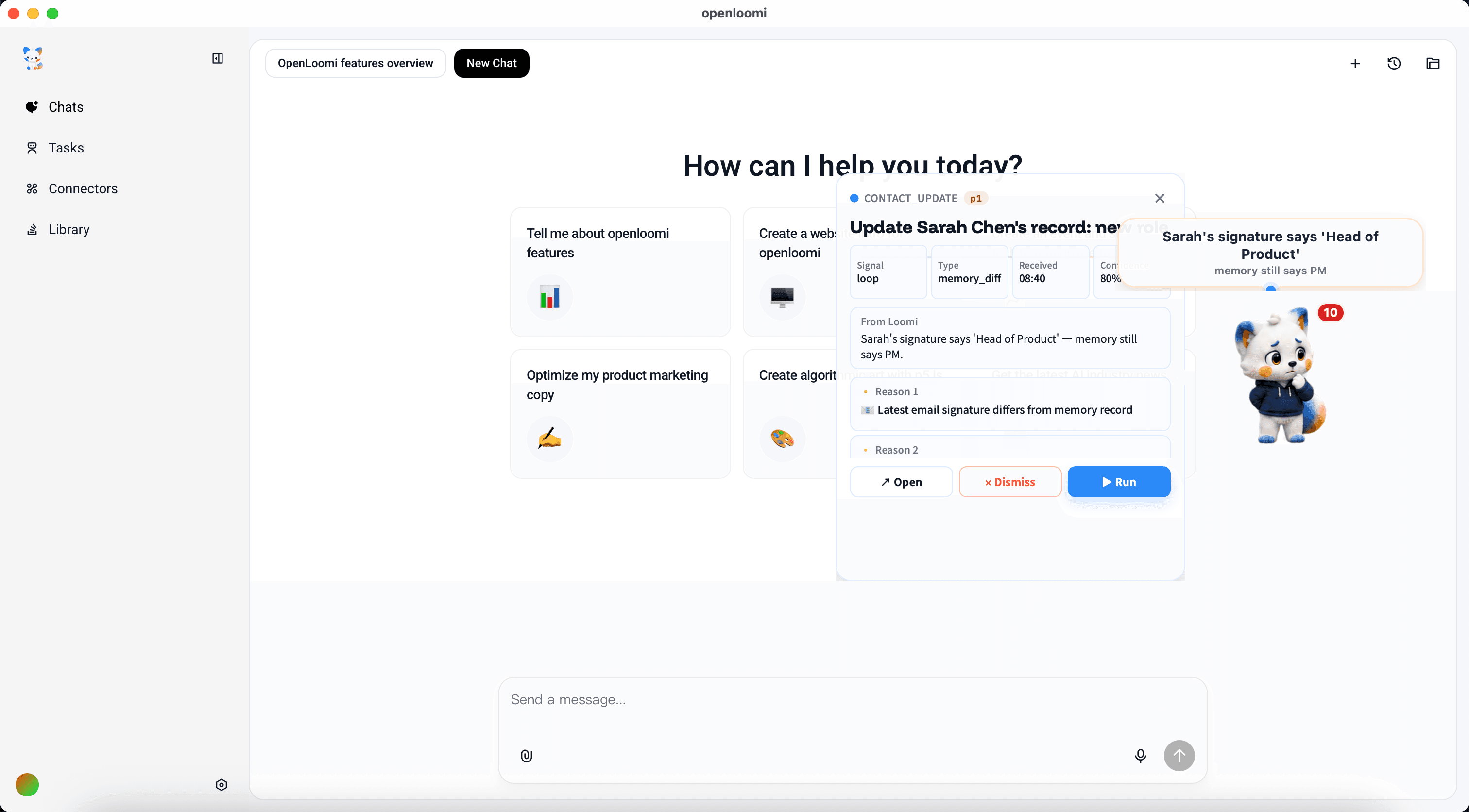
digest includes a "From Loomi" callout ("Sarah's signature says
'Head of Product' — memory still says PM" — the same drift the Loop is
about to surface as a CONTACT_UPDATE card), a "Last 7 days (50
insights total)" table with # / Time (UTC) / Type / Importance / Title columns (auto-captured Claude Code session snapshots, Screen
Memory captures, occasional archive notes), and Notes at the
bottom explaining the mix.
This is the read-only doorway into OpenLoomi's local memory. For a
deeper search, pass a query: /openloomi:memory <query>.
Reading is half the story — you can also write. From any Claude Code turn, invoke openloomi-memory add-memory "<text>" --file=<path> and the entry lands in ~/.openloomi/data/memory/<path>. Below, "My boss is Tom." is saved to people/boss.md and immediately searchable via search-memory "boss" or search-all "boss tom".
The command hits GET /api/loop/state and returns the Loop dashboard:
enabled status + last tick, counts (pending decisions / done /
dismissed / signals seen), per-connector health (needs_setup /
local-only / linked), prefs in effect (tick frequency, brief time,
quiet-when-empty, desktop notifications, …), and actionable notes
(e.g. "all 5 Composio-backed connectors share one failure: the local
Composio surface isn't reachable — Loop can't pull signals until
/openloomi:connect walks the Composio install").
This is purely a dashboard snapshot — the Loop never takes destructive
actions from this command. For actions, the Loop pops cards in the
desktop app (step 15) and you decide there.
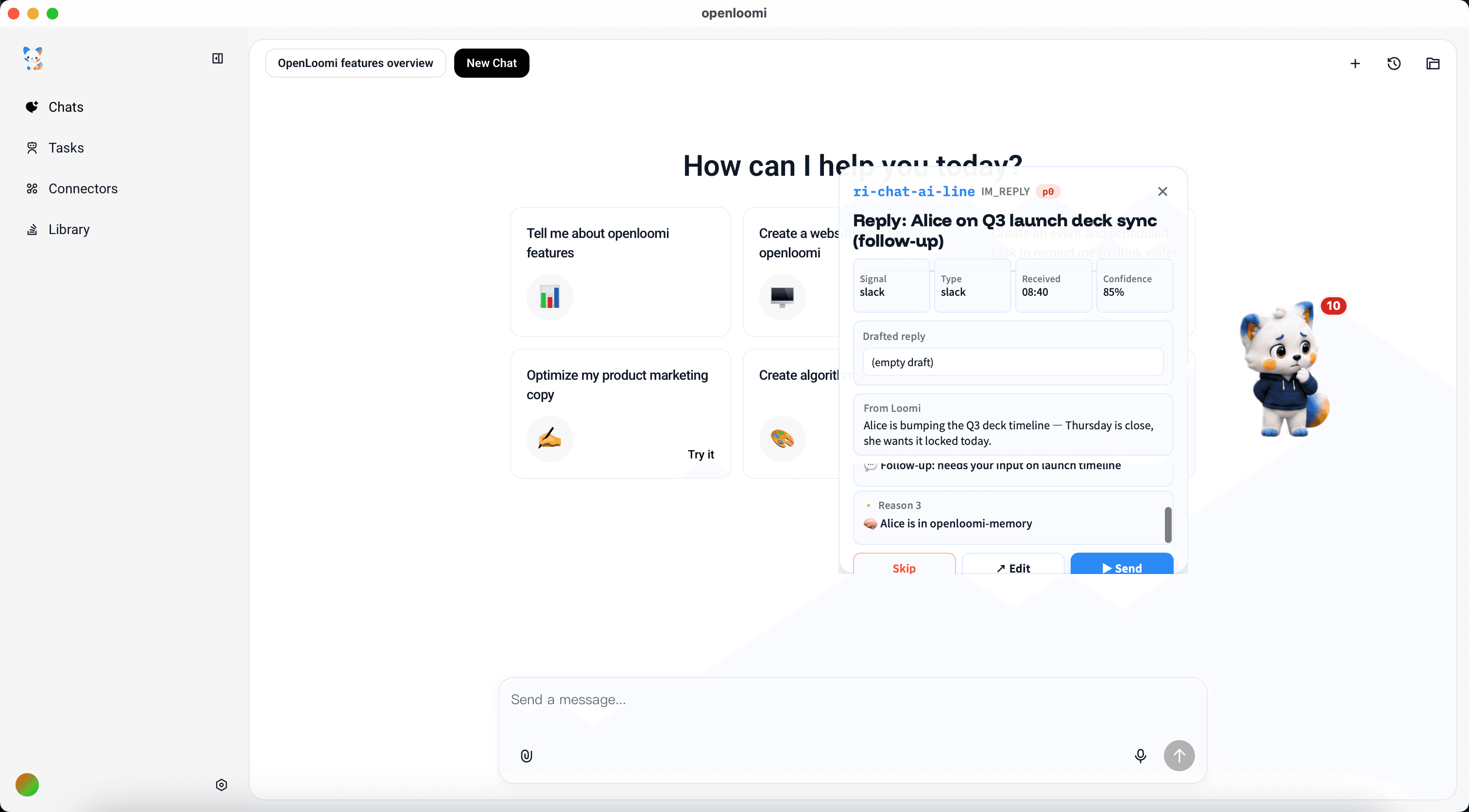
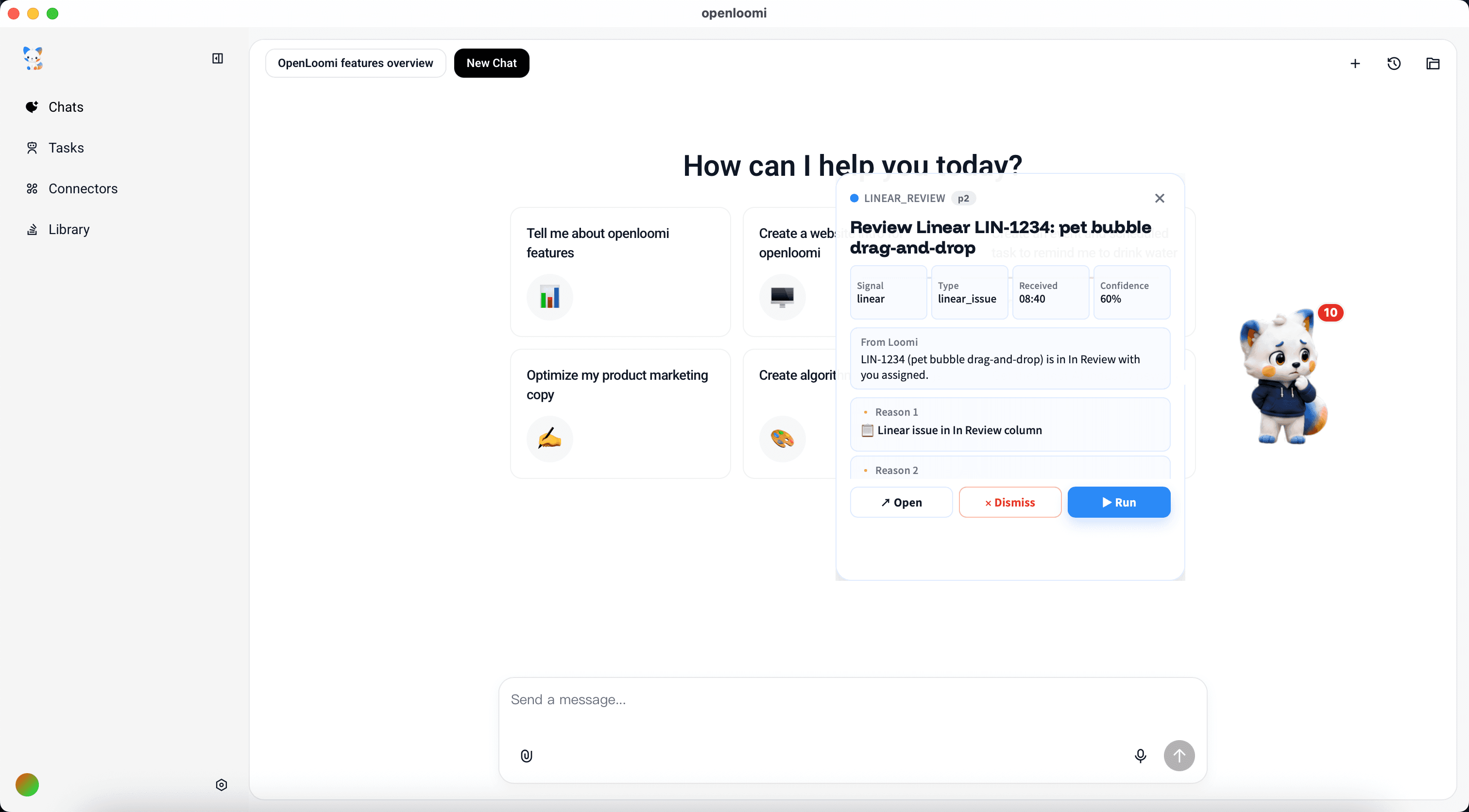
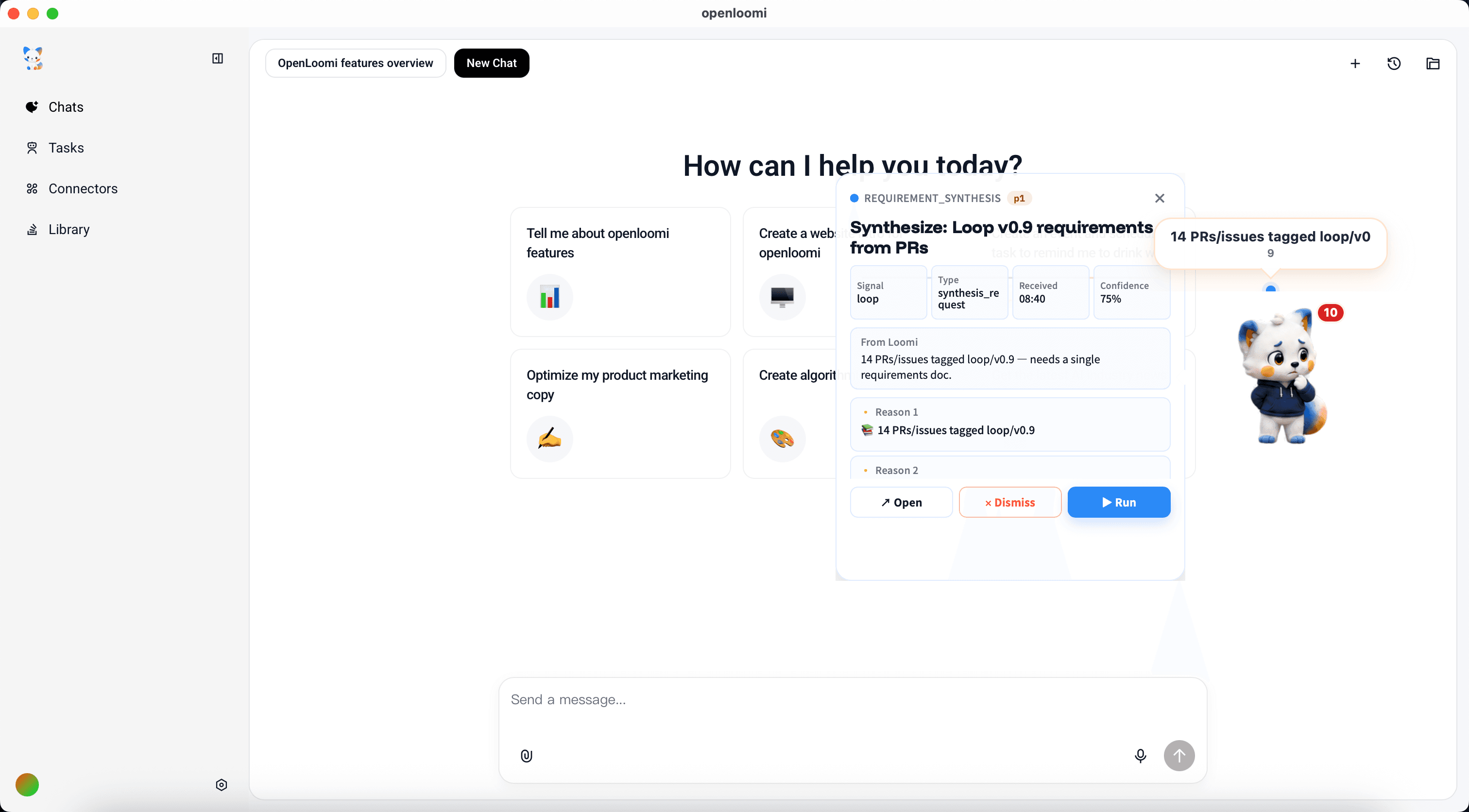
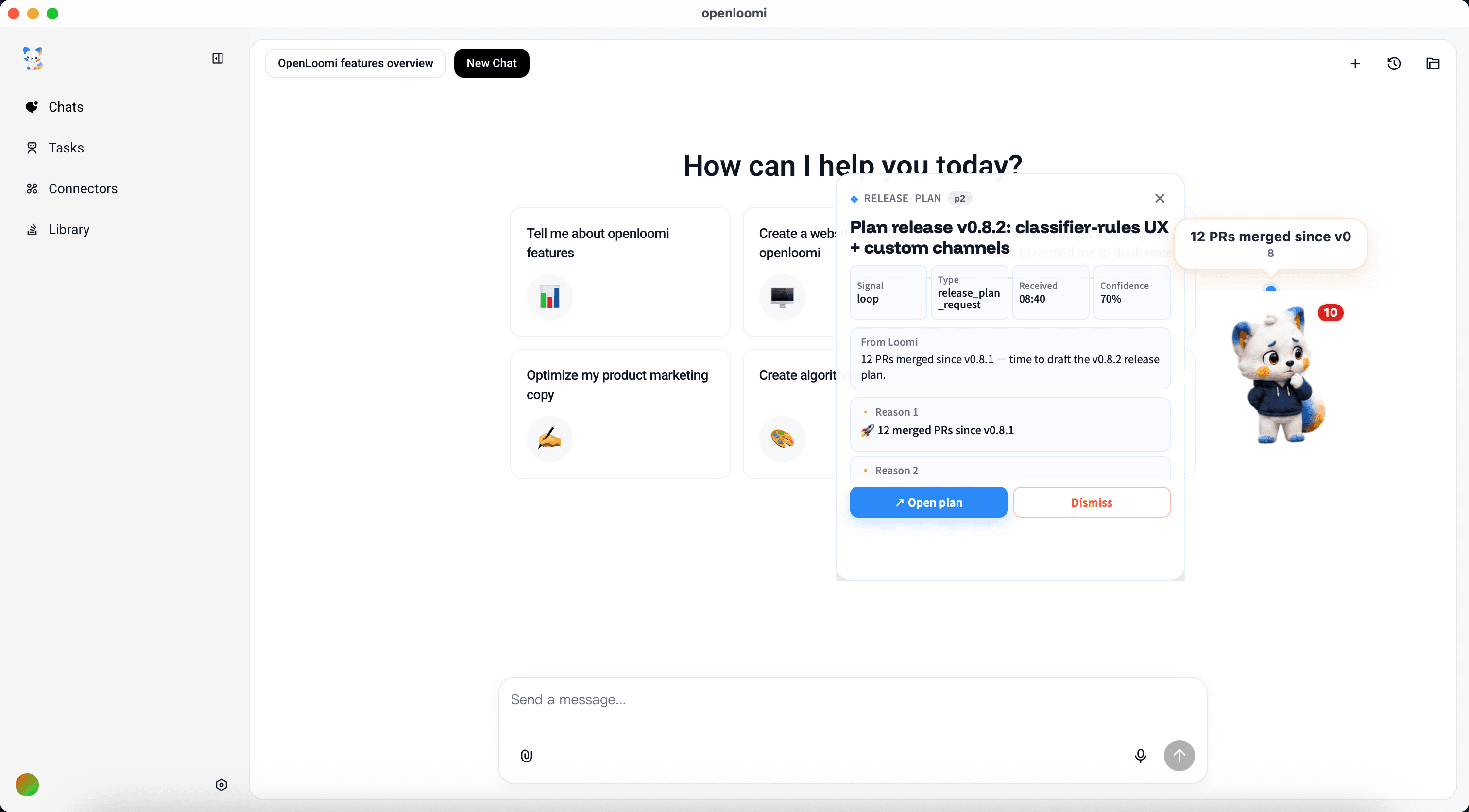
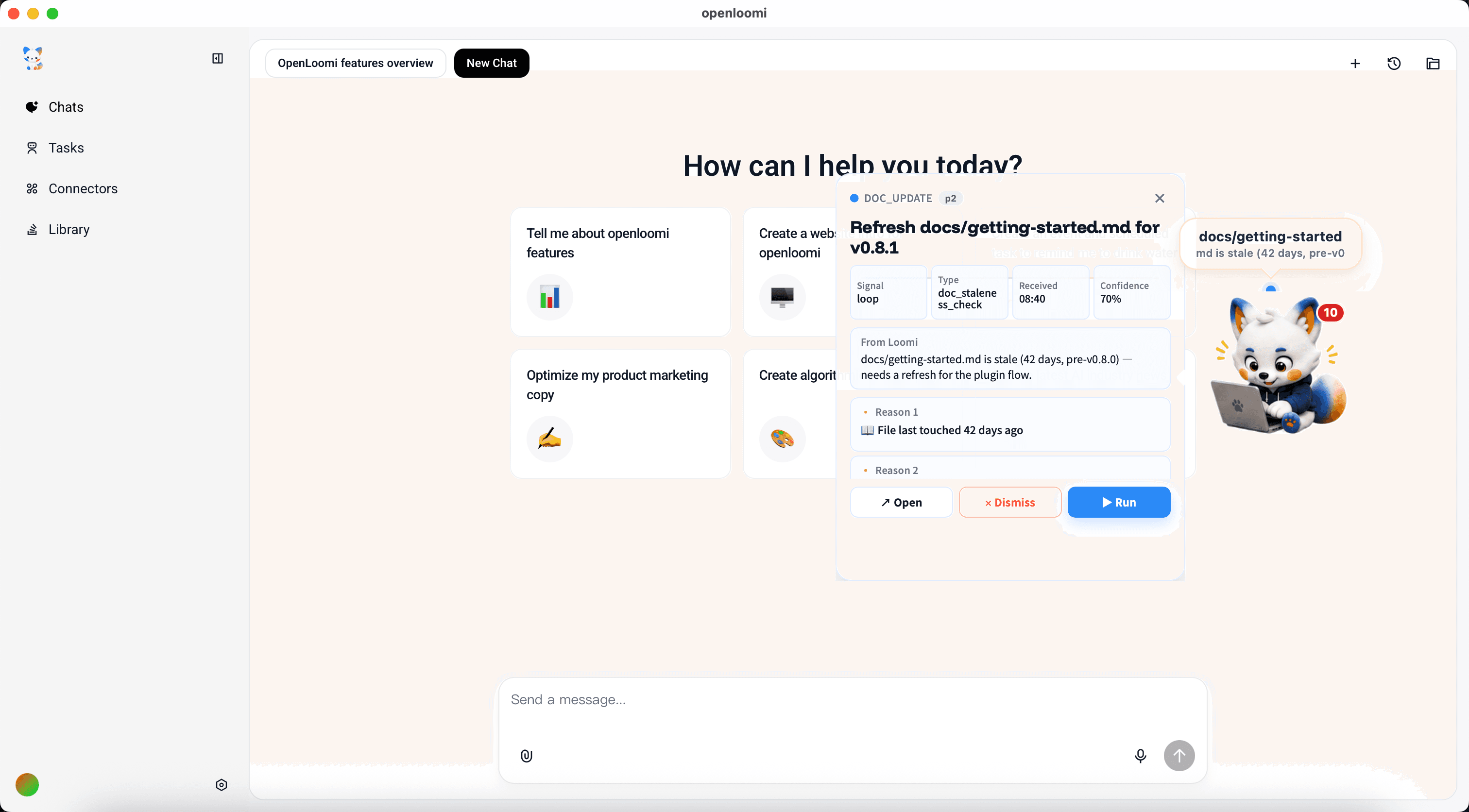
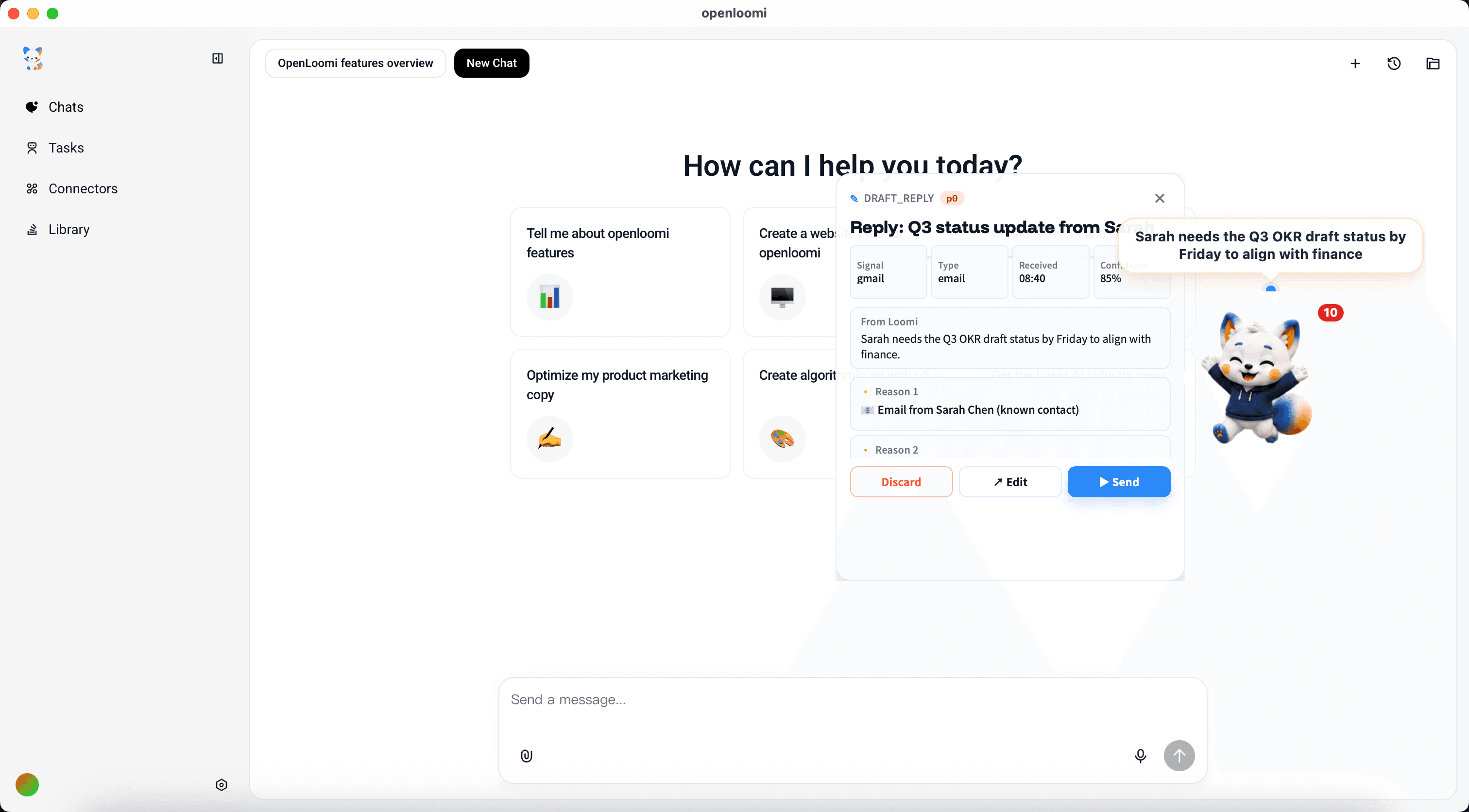
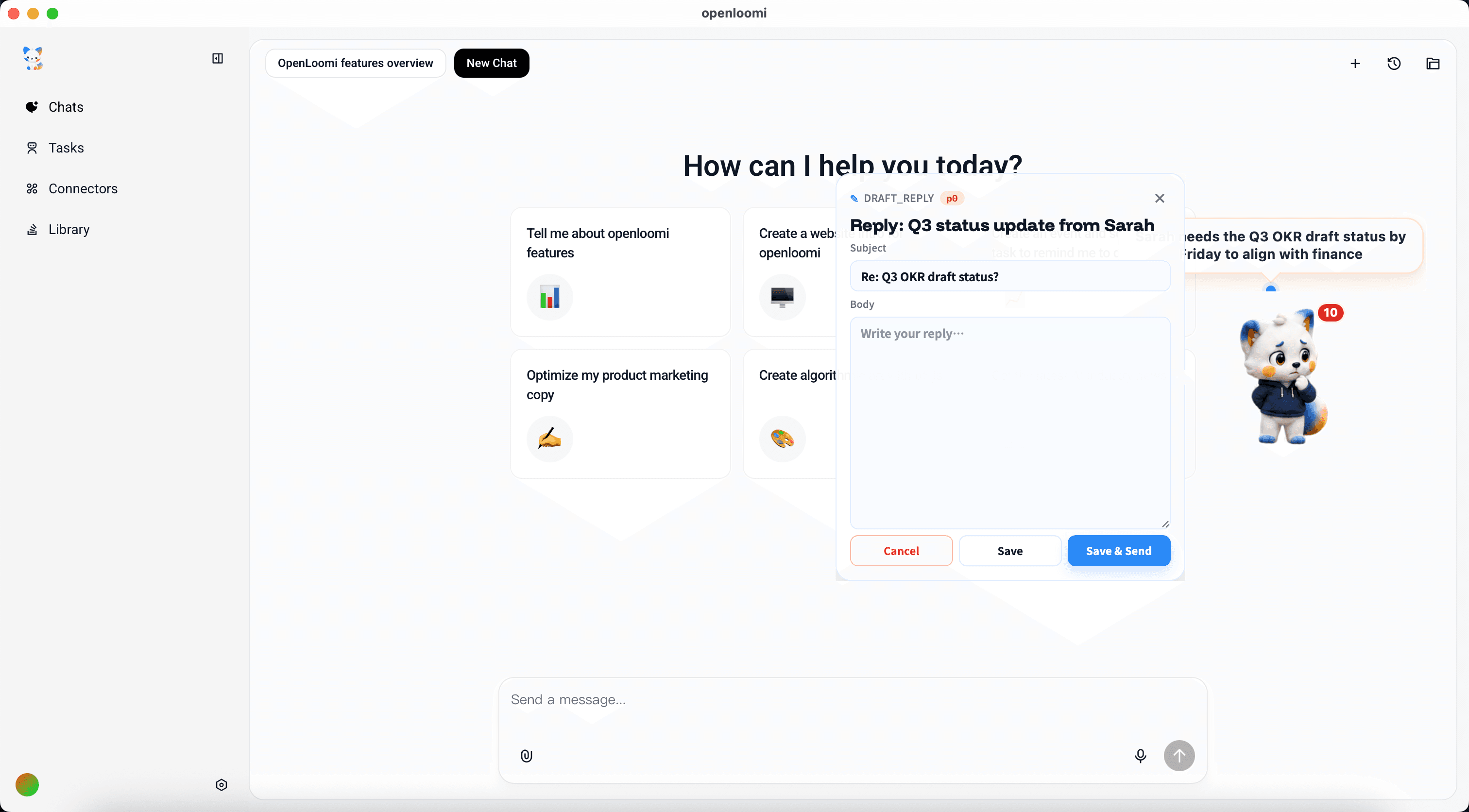
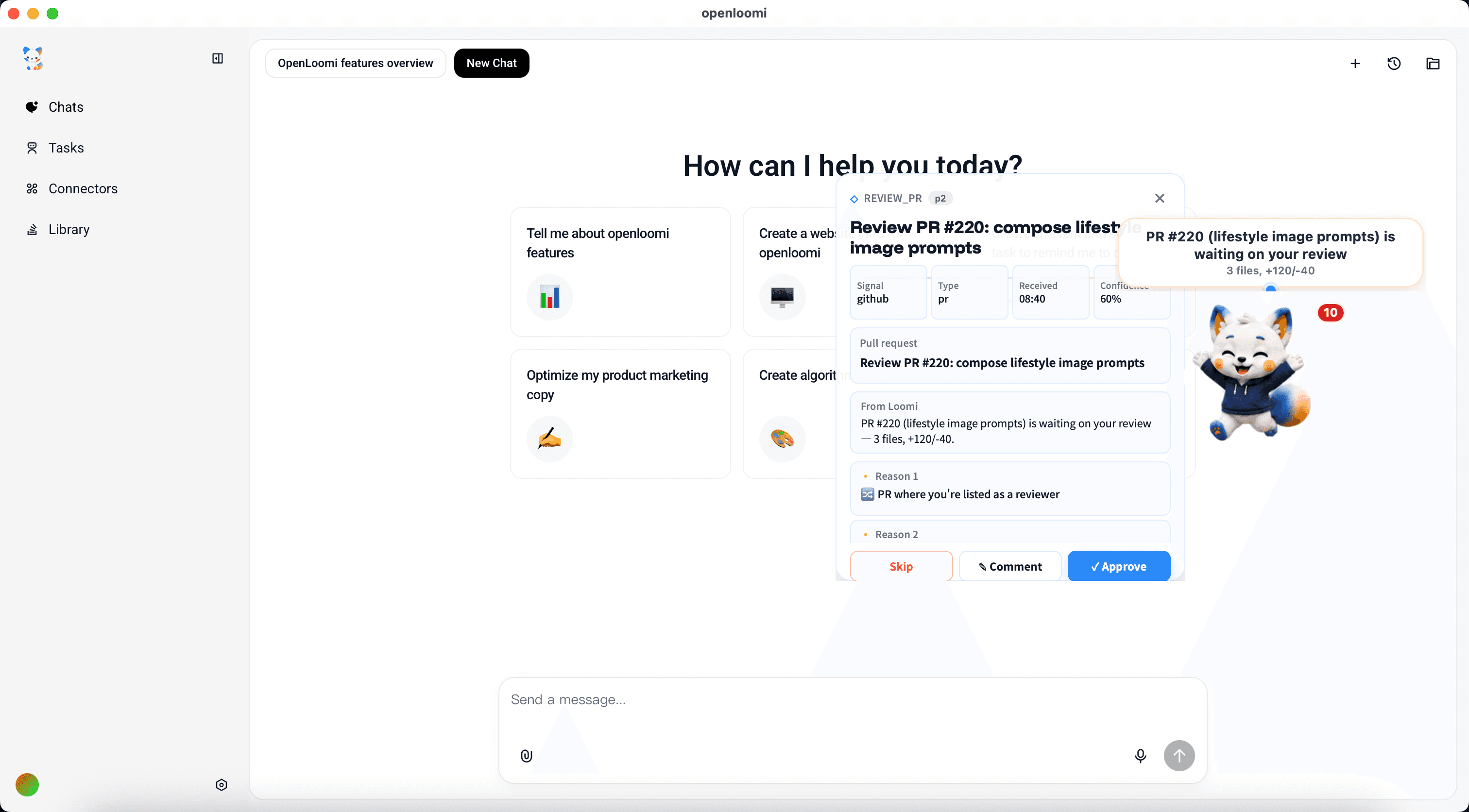
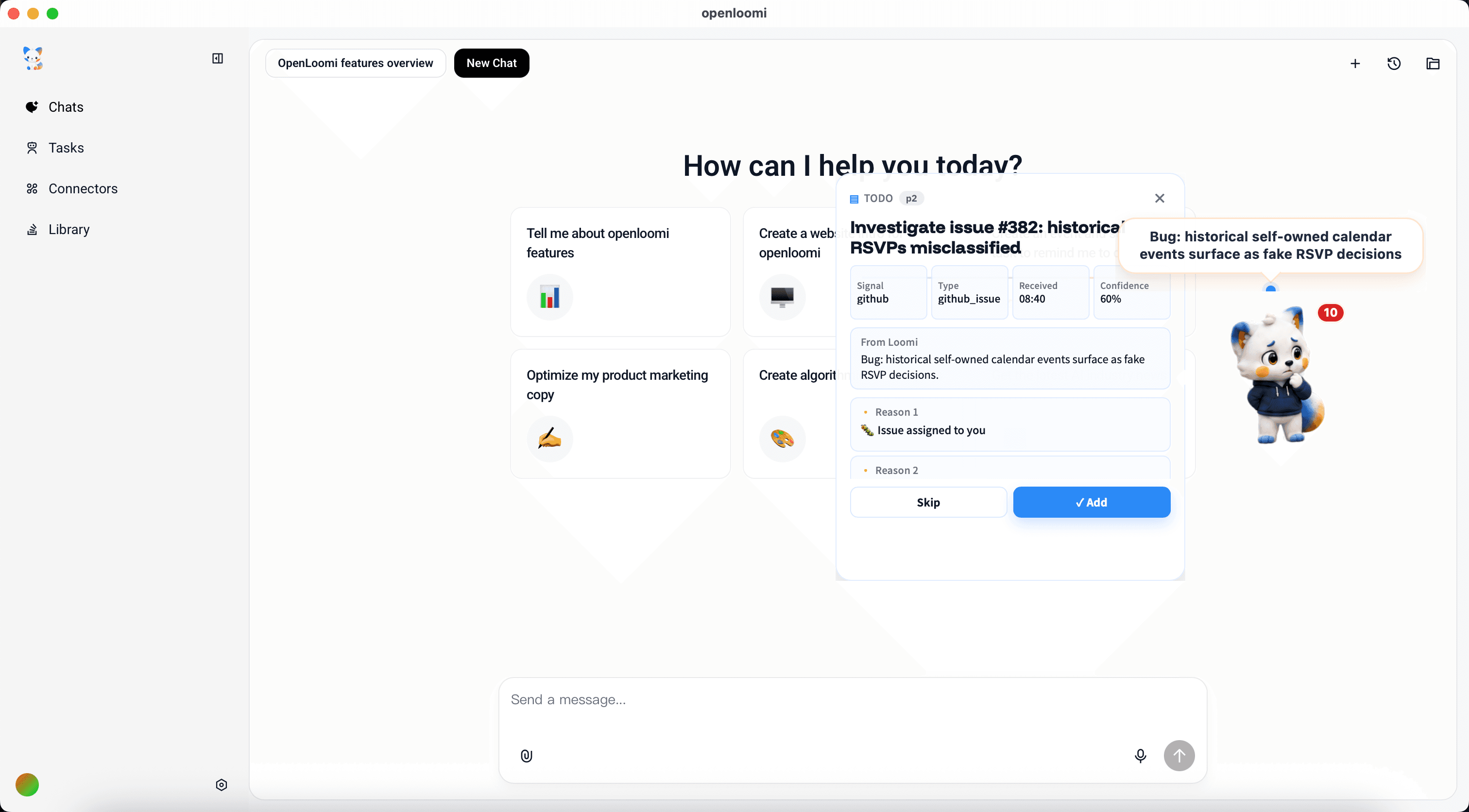
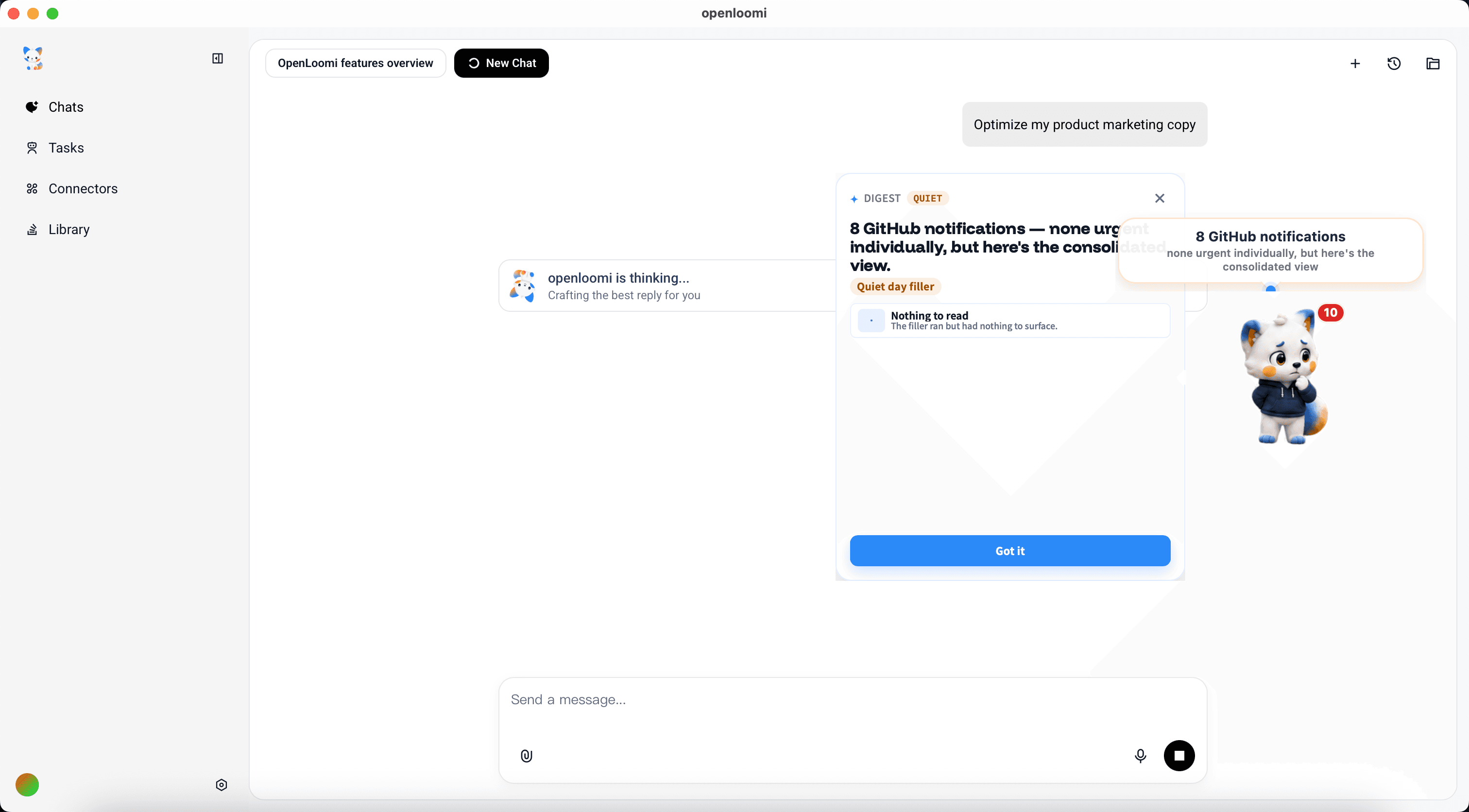
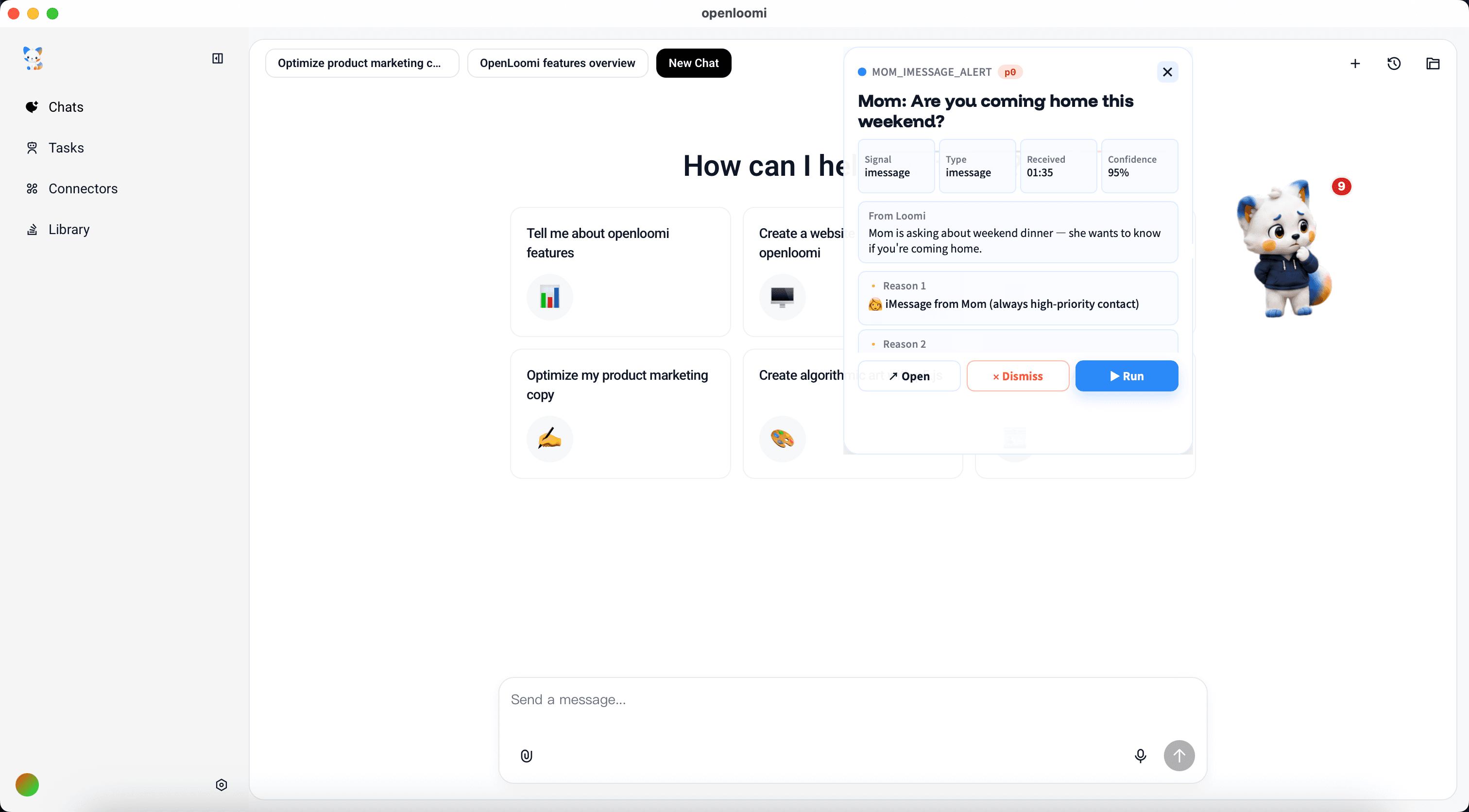
This is what the system looks like once it's humming. OpenLoomi's Loop is the proactive execution brain: it watches your connected signals, classifies them into decision types, and pops a card into the desktop app with the reasoning trace and the actions you can hit.
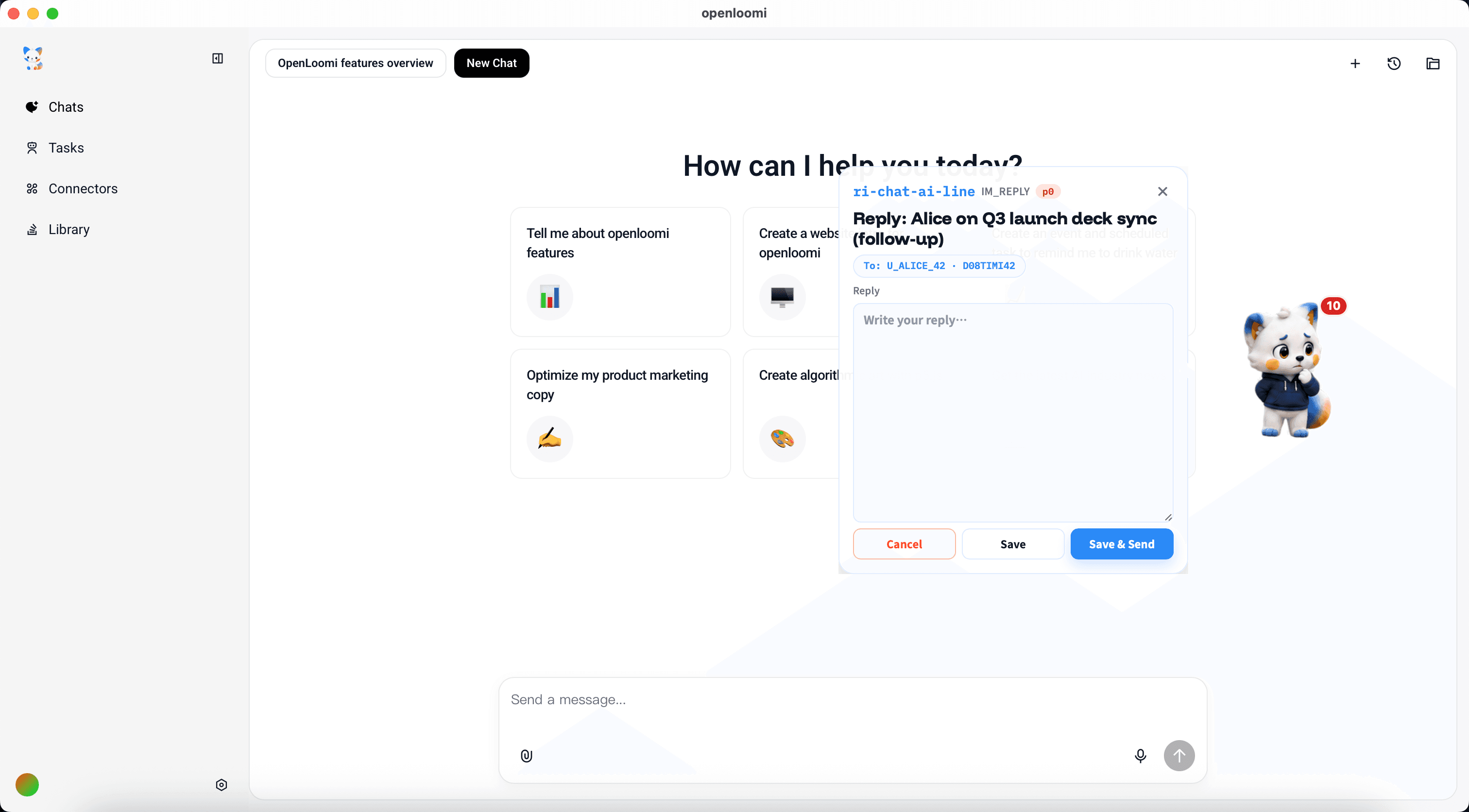
Every card has the same shape: Signal + Type + Received + Confidence at the top, the From Loomi explanation, the Reason 1 / Reason 2 evidence, and the action buttons at the bottom.
The Loop ships with these decision types out of the box:
The action row at the bottom of every card turns a recommendation into a real outcome. The exact buttons depend on the card type:
RSVP (calendar invitation): Attend (primary) · Decline (outline) · View original (ghost). Tap Attend or Decline and OpenLoomi fires your Yes / No straight back through the connected Google Calendar as a calendar_rsvp action — no opening the event yourself to click the RSVP buttons.
Reply / update cards (IM_REPLY, EMAIL_REPLY, REVIEW_PR, LINEAR_REVIEW, REQUIREMENT_SYNTHESIS, RELEASE_PLAN, CONTACT_UPDATE, DOC_UPDATE, DEADLINE_REMINDER, TODO): Dry run (outline) · Edit · Run (primary when ready) · Dismiss (ghost). Dry run previews the exact draft or plan without firing; Run schedules the action through the right connector — email_reply via Gmail, im_reply via Slack / iMessage, github_review via the GitHub Reviews API, linear_review via Linear, requirement_synthesis / release_plan / doc_update into the local knowledge base, contact_update into memory, todo into the local todo store.
Quiet digests (DIGEST / QUIET_DIGEST / github_notification): Mark as read only — read-only aggregations, nothing to execute.
Two affordances live outside the action row so they never collide with the decision itself:
Card-level Dismiss sits in the header kebab (three-dot menu). Dismissing a card never accidentally declines a meeting. A mute rule is created for that signal scope, so the same hint won't resurface today.
Cancel scheduled action appears for ~30 s after you tap Run / Attend / Decline. The action is queued as a cron job before it actually fires — Cancel stops it. A per-card audit history (under the technical details) records every attempt with its terminal state (completed / skipped / blocked / failed / cancelled / superseded), so contradictory responses (e.g. RSVP "No" then "Yes") appear side-by-side instead of overwriting each other.
If the underlying connector refuses (the runner returns blocked or failed), the action row stays open with a one-tap retry — the card never silently flips to done when nothing actually happened.
The Loop is extensible. Drop a PUT /api/loop/types against the local runtime and your custom card joins the queue.
TOKEN=$(cat ~/.openloomi/token | base64 -d)curl -s -X PUT -H "Authorization: Bearer $TOKEN" -H "Content-Type: application/json" \ http://localhost:3414/api/loop/types \ -d '{ "id": "mom_imessage_alert", "label": "Mom iMessage", "icon": "👩", "actionKind": "todo", "description": "Triggers when mom sends an iMessage — surfaces as a high-priority todo so you never miss her" }'
Hooks are opt-in — run /openloomi:hooks install to write a marked block into ~/.claude/settings.json (merge-no-overwrite, atomic; keyed so it can be cleanly removed). Once installed, Claude Code lifecycle events mirror onto the Pet:
Claude Code event
Pet state
SessionStart
greet
UserPromptSubmit
thinking
PreToolUse
working
PostToolUse
thinking
SubagentStart
juggling
SubagentStop
thinking
Notification
needsinput
Stop
archive → happy
The Stop hook also archives context: it reads the session transcript, keeps the last 6 turns (capped at ~6 KB), and POSTs a note to /api/insights under the claude-code group. The Stop hook always exits 0 — an archive failure never blocks Claude Code.
The states idle, sleeping, sweeping, and presenting are owned by OpenLoomi's Loop watcher; don't set them manually from Claude.
/openloomi:status (bridge setup-status --json) returns a stable shape:
Field
Meaning
mode
env | packaged | source | unconfigured
installed
desktop app found
version
detected OpenLoomi version
tokenPresent
a local auth token exists
aiProviderConfigured
a conversation provider is configured (runtime-sourced signal, see nativeRuntime)
nativeRuntime
probe of the host's claude CLI: available, authenticated, reason
apiReachable
local HTTP API responded
hooksInstalled
Pet/archive hooks present
ready
everything needed is in place
nextAction
what to do next (see reasons below)
reason
machine-readable status code
source
how the install was discovered
aiProviderConfigured is derived from the runtime's nativeRuntime
probe (authenticated = true means the host's claude CLI is signed
in), with user-saved anthropic_compatible rows as a fallback. The
plugin never reads AI provider env vars and never publishes their
values.
Launch the app once so the helper binary is written.
SOURCE_FOUND_CLI_NOT_BUILT
build_or_stage_openloomi
cd $OPENLOOMI_REPO_DIR/apps/web/src-tauri && cargo build --release.
LOGIN_REQUIRED
login_openloomi
/openloomi:setup mints a guest bearer.
AI_PROVIDER_REQUIRED
configure_ai_provider
Sign in to the host claude CLI (claude auth login), or save an Anthropic-compatible endpoint in Preferences → API Settings.
Pet doesn't switch states. Confirm hooks are installed (/openloomi:hooks status) and the app is running (/openloomi:status → apiReachable). ENDPOINT_MISSING is non-blocking.
Where do Stop archives go? They're posted to /api/insights under the claude-code group and surface in your Insight Box.
unconfigured mode. The plugin couldn't locate an install — run /openloomi:setup or provide a path.