Memory
OpenLoomi's memory system is a local-first, tiered knowledge base built from messages across connected platforms. Memory grows on its own over time — completely visible and auditable. Unlike other AIs with a "forgetting engine," OpenLoomi remembers everything that matters, with full transparency into what it knows about you.
This document covers the system architecture, data model, and the relationships between components.
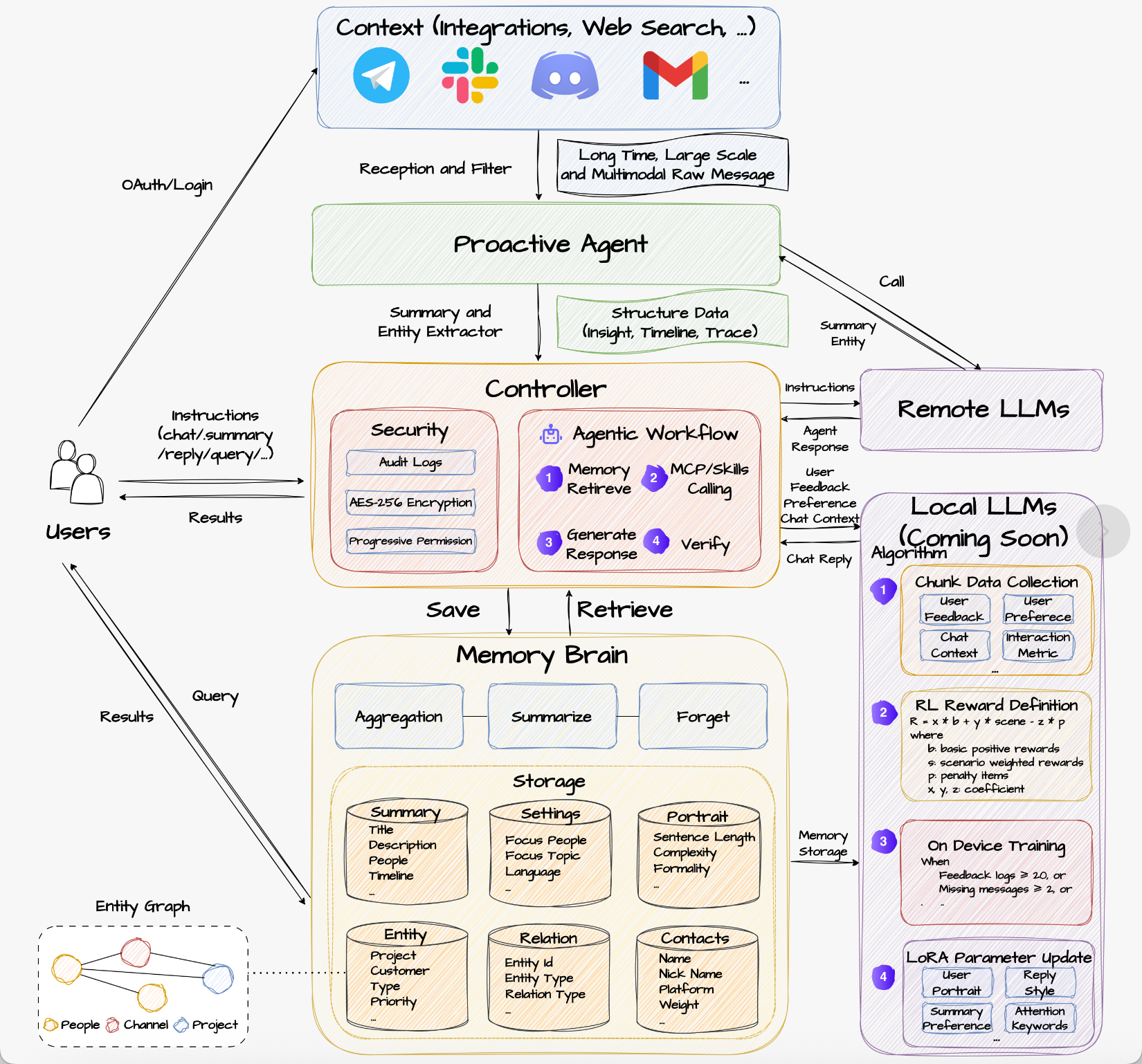
What the system continuously knows
The memory is not a document library, nor a chat log. It is a living archive with structure, timestamps, and reasoning — six kinds of records:
-
Entity records — the same object appearing across different contexts gets merged into one tagged record, not a stand-alone string. For example, "Alice is now a Senior Engineer" carries a start date, source conversation, owning task, owning channel, and an expiry date. The record keeps updating and changing.
-
Decision trail — not just "what is true now" but "why did it become true." When a discount moved from 10% to 20%, the chain (the service incident + the VP's exception + the prior quarter's precedent) is stored explicitly, not flattened to a single fact. See Insights for how this surfaces in the structured layer.
-
Entity relationships — entities are not isolated. "Customer A" → "Ticket #1234" → "VP Zhang" has an "approved-by" edge. Edges are not predefined — they emerge from use. The more often two entities are pulled together, the stronger the connection.
-
Temporal validity — every fact has an explicit "valid from / superseded by" interval. The system can answer "what did I tell you about X last quarter?" by re-entering the snapshot at that point in time. See Time-Travel Queries for the query surface. The same interval semantics apply to commitments — "I'll have it Friday" is one interval, "pushing to next Wednesday" is a second interval that supersedes the first. The earlier interval is not deleted; it is closed and linked as the source of the transition.
-
Source and credibility — every belief carries a source tag distinguishing "the user said it" from "the AI inferred it." The two have different weights. A VP's approval in a private Slack DM is high-weight evidence; an AI-inferred possibility is low-weight evidence.
-
Scope boundaries — which memories belong to which user, workspace, and tenant is strictly isolated at the architecture level. Cross-tenant access requires an explicit relationship; sharing is never the default.
Commitment Lifecycle
The hardest thing to keep straight across tools is not what was said, but what is still true. A commitment is not a static sentence — it is a small state machine that moves over time, often across channels. This is what makes OpenLoomi a context runtime, not a memory store: the state machine is the unit of work, and the Holistic Context underneath it is the substrate that records and replays every transition.
For developers building on Claude Code / Codex / OpenClaw / Hermes: the same primitives — attributable entities, time-bounded validity, supersession, and Approve-before-action — are what let your agent answer "what changed since yesterday?" and "which earlier belief is now stale?" without you wiring that logic yourself. See the Attention Agent for how those primitives surface to the user, and Loop for how they turn into decision cards.
proposed → accepted → changed → done
                       ↘ dropped
"I will send the investor update by Friday" and "pushing the investor update to next Wednesday" are not two independent facts. The second message is a state transition that supersedes the first. If a system stores both as facts and reminds you of both, it has failed at the only job that matters: keeping the current state correct.
OpenLoomi models commitments as first-class objects so this stays auditable:
| Field | What it captures |
|---|---|
owner | Who is accountable for the deliverable |
object | What is owed ("investor update", "Q2 retro doc", "design review for PR #482") |
currentDueDate | The deadline as of now, not as originally said |
lifecycleStatus | proposed / accepted / changed / done / dropped |
previousStates[] | The history of prior states — what the deadline used to be, when it changed, why |
supersededBy | Pointer to the event (and source) that replaced the prior state |
source | Where it was first proposed — Slack thread, PR comment, email, doc |
lastVerifiedAt | When the system last saw evidence that this commitment is still the current belief |
confidence | How sure the system is that the current state is the right one (not the prior one) |
The two design choices that matter most:
- States are replaced, events are append-only. A commitment moves from
accepted → changed, but the original message that proposed it is preserved verbatim. The "what did we believe on Tuesday?" query stays replayable. - Uncertainty is surfaced, not silently resolved. If a later message might supersede an earlier one but the system isn't certain, it doesn't quietly update state. It marks the entity
disputedand asks the user to confirm. Auditable uncertainty beats confident wrongness — a tracker that is right 80% of the time forces people to verify everything, which is more work than no tracker at all.
How a commitment moves through the lifecycle
A concrete walk-through is more useful than a diagram:
| Day | Event | System action |
|---|---|---|
| Mon | Slack: "I'll send the investor update by Friday." | Create commitment c_8421: owner Alice, object "investor update", due Fri, status accepted |
| Tue | GitHub PR comment: "Pushing the investor update to next Wednesday — metrics changed." | Detect supersession; update c_8421: currentDueDate = Wed, lifecycleStatus = changed, link the PR comment as the superseding source, append the prior state to previousStates |
| Wed | Slack: "Final investor update is ready." | Update c_8421: status done, set completedAt, link the document |
| Any | User asks: "What changed about Alice's investor update?" | Replay the chain: original Slack message → Tuesday PR comment → Wednesday Slack message |
This is what makes OpenLoomi different from "a memory system that stores sentences." The useful unit of recall is not a sentence — it is a commitment with a current state, a history of prior states, and an evidence trail for every transition.
Commitment tracking is one of the workloads the Holistic Context primitives are designed for — entity attribution, time-bounded validity, evidence preservation, and supersession. It is being actively validated against real workflows; see Benchmarks for the underlying temporal reasoning numbers and Connectors for how the system earns the right to read the data that drives these transitions.
Mental model
OpenLoomi memory is built from three pillars:
| Pillar | Question it answers | Where it lives |
|---|---|---|
| Raw messages | "What was said, exactly?" | raw_messages table — verbatim platform messages |
| Summaries | "What was the gist of this period?" | memory_summaries table — derived compressions |
| Insights | "What was decided / committed / blocked?" | insights table — AI-extracted structured records |
| Knowledge Base | "What's in this PDF I uploaded?" | rag_documents + rag_chunks — user-uploaded files |
All four originate from platform messages (and other context inputs like local files, audio/video, screenshots, Browser Use / Computer Use operation traces), but diverge into different representations for different query patterns.
The Four Pain Points of Agent Memory
Current agent memory systems suffer from four critical challenges:
-
Memory Brittleness — Agents struggle to establish meaningful connections in massive, scattered data. Raw storage without intelligent curation leads to context rot, where agents can't distinguish signal from noise.
-
Temporal Reasoning Deficiency — Time-sensitive queries like "what did I work on last week?" fail because systems lack dynamic updates and long-term knowledge tracking with temporal context.
-
The Forgetting Dilemma — "Remembering everything" isn't the goal. Naive retention leads to information overload and context rot, while aggressive forgetting loses critical information.
-
Evaluation Gap — Industry benchmarks lack standard maintenance and continuous improvement, making it impossible to quantitatively measure progress in real business scenarios.
The Solution
Unlike traditional memory systems that merely store and retrieve messages, the Holistic Context builds structured knowledge from raw data through a self-evolving closed loop:
Diverse context sources (email, IM, screen [Screen Capture], audio)
    ↓
Raw messages (scattered)
    ↓
Structured Memory Insights + Timeline
    ↓
Agent reads memory before execution → updates memory & detects after
    ↓
Spatial dimension: Hebbian Memory Connections
Temporal dimension: Time-Travel Queries
OpenLoomi transforms this pattern for personal AI agents, extracting structured insights from diverse context sources — connectors (email, IM), the Screen Capture screen-aware memory subsystem (macOS), and audio capture — and building the Holistic Context through progressive abstraction.
System Overview
The memory system spans five distinct data layers, each serving a different purpose in the information architecture:
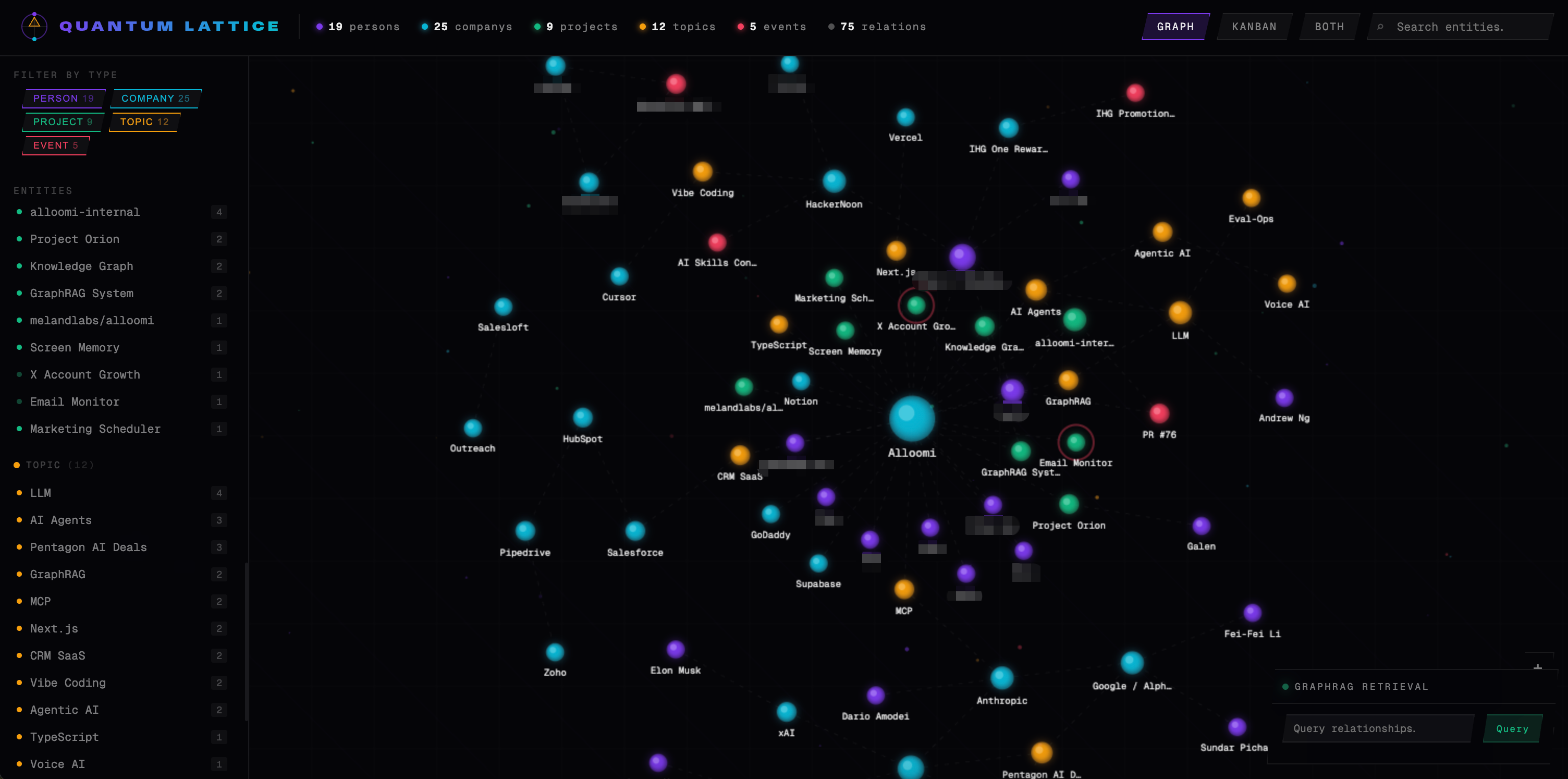
| Layer | Storage | Purpose |
|---|---|---|
| raw_messages | Local | Verbatim message records — the ground truth |
| memory_summaries | Local | Compressed summaries — derived from raw messages |
| Insights | Local | AI-extracted structured records from platform messages |
| Knowledge Base | Local | User-uploaded document chunks for RAG |
| Vector index | Local | Semantic search across all layers |
The full pipeline maps to the MelandOS architecture:
Connectors → Processor → Memory → Insights → Chat/Search → Weight Adjustment + Forgetting Engine → Knowledge Base + MCP ToolsWhen a message arrives from a connector, it flows through this pipeline:
- Stored as a
raw_messagesrecord withmemoryStage: "short" - Embedded; embedding stored alongside the record
- Added to the vector index for semantic retrieval
- Periodically processed by the forgetting engine, which may compress groups of records into
memory_summaries
The three layers are not redundant — they serve different query patterns. Raw messages answer "what was said exactly." Summaries answer "what was the gist of this time period." Vector index answers "what messages are semantically similar to this query."
How the system captures, cleans, and updates knowledge
Capture — tag at ingest, not in post-processing. Every record is tagged the moment it arrives (task, conversation, channel, person, valid-from). The tag set is the Insights structure, not a later pipeline stage. See Insights for the schema.
Cleaning — three rules.
- No silent overwrite. When new evidence conflicts with an old belief, the new evidence does not directly replace it. They form a "competing" pair and only the stronger side wins after a full evaluation. States can be replaced; events are append-only.
- Doubt interval. When two pieces of evidence are too close in weight, the system does not pick a side. The entity is marked "disputed" and both sides are surfaced on query, so the user judges.
- Close old validity on revision. Only after a new belief is accepted does the old belief's "valid-until" close. The transition "the system knew X on Tuesday, knew ¬X on Wednesday" becomes a queryable state change rather than an implicit overwrite.
Association — emergent, not predefined. Connections are built from use, not from a schema. Two entities retrieved within 5 minutes strengthen their edge; unused edges slowly decay. Edges that cross an "active connection" threshold qualify for multi-hop expansion; edges that sink to the bottom degrade to background. This is Hebbian learning in practice — it avoids the static build/update cost of a traditional GraphRAG knowledge graph and builds the graph progressively instead of constructing it in one shot.
Update — revisions are replayable state transitions. The system can answer "what did you believe in June 2024?" by entering that snapshot exactly, and "when did Alice's title change from Engineer to Senior Engineer, and what triggered it?" by looking up the source event.
Forgetting — tiered eviction plus auditable compression. Records move through three tiers by age and value score, with summaries preserving the link back to source records. See The Forgetting Engine for the full scoring and tier-transition logic.
Data Model
Raw Messages
raw_messages is the primary local object store. Each record represents a single ingested message.
raw_messages
├── id                    # Auto-increment primary key
├── messageId             # Platform-specific message ID (unique index)
├── platform              # slack | discord | telegram | imessage | ...
├── userId                # Owner of this record
├── botId                 # Bot/user who sent the message
├── channel               # Platform channel identifier
├── person                # Contact or conversation identifier
├── timestamp             # Unix ms when message was sent
├── createdAt             # Unix ms when stored locally
├── content               # Full message text
├── attachments          # [{name, url, contentType, sizeBytes}]
├── embedding             # 1536-dim float array
├── embeddingModel        # e.g. "text-embedding-3-small"
├── embeddingContentHash  # FNV-64a of content for dream/re-embed detection
├── embeddingDimensions   # Should be 1536
├── embeddingUpdatedAt    # When embedding was last computed
├── metadata             # Platform-specific extras
├── memoryStage          # "short" | "mid" | "long"
├── accessCount           # Number of times this record was retrieved
├── lastAccessAt         # Unix ms of last retrieval
├── importanceScore      # 0-1, provided importance signal
├── archivedAt            # Set when details are archived after summarization
├── isPinned             # User-marked important
└── summaryRefId          # Reference to the memory_summaries record, if summarized
Indexes:
userId_memoryStage(compound) — filters records by owner and tier for forgetting engine candidate scansuserId_timestamp(compound) — enables time-bounded queries sorted by recencymessageId(unique) — fast platform-ID lookuparchivedAt— cleanup for hard delete of old archived recordsisPinned— filter pinned records
Memory Summaries
memory_summaries stores compressed representations of groups of raw messages. Created by the forgetting engine during tier transitions.
memory_summaries
├── summaryId          # "ms_<hash>" — deterministic ID from inputs
├── userId             # Owner
├── summaryTier        # "L1" | "L2" | "L3" (maps from short→L1, mid→L2, long→L3)
├── sourceTier         # The tier before transition
├── startTimestamp     # Inclusive start of the grouped window
├── endTimestamp       # Inclusive end
├── messageCount       # How many raw records are in this summary
├── sourceRecordIds    # IDs of the compressed raw_messages records
├── keyPoints          # Extracted highlights from the group
├── keywords           # Extracted keyword tokens
├── keywordsText       # keywords[] joined for contains() search
├── summaryText        # Human-readable one-paragraph summary
├── dimensions         # {platform, channel, person, botId} — preserved from source
├── qualityScore       # 0-1 quality indicator from summarizer
├── createdAt          # When summary was created
└── updatedAt          # Last modification time
Indexes:
userId_summaryTier(compound) — filter by summary leveluserId_endTimestamp(compound) — time-bounded queries by recency
The sourceRecordIds array is the link between layers. A summary references the raw records it was derived from. Raw records reference their summary via summaryRefId.
Relationships
raw_messages (N) ←─────── (1) memory_summaries
     │
     └── summaryRefId ──────────→ summaryId
     └── sourceRecordIds ────────→ id (reverse)

One raw_messages record belongs to one summary (after summarization).
One memory_summaries record covers N raw_messages records.
When a record is archived (archivedAt is set), its content field is omitted from the in-memory representation — the details are considered "compressed." The original raw message is preserved in metadata.__rawMessage for potential reconstruction.
Vector Layer
Vector Storage
Vector storage varies by platform:
Desktop uses a dedicated vector engine. Web stores vectors directly in the raw_messages.embedding field.
Cosine similarity is computed client-side:
similarity = dot(vecA, vecB) / (norm(vecA) * norm(vecB));Search scans up to scanLimit = limit * 10 records, computes similarity against each, filters by threshold (default 0.7), and returns top limit sorted by similarity.
Hybrid Search
Search uses both vector similarity and keyword matching:
- Semantic path: Embed query → vector search → similarity scores
- Keyword path: Query keyword field → exact matches
- Merge: Results combined and sorted by relevance
The keyword index catches exact matches (specific names, IDs, dates) that semantic similarity might miss due to embedding variance.
The Forgetting Engine
The forgetting engine is a scheduled background process that manages the memory lifecycle. It promotes records between tiers and compresses groups into summaries.
A core insight from our experience: memory isn't about storing longer — naively storing everything leads to context rot where agents drown in noise and can't establish meaningful connections. The real challenge is building algorithms that can distinguish signal from noise, and the forgetting algorithm is harder to get right than the storage algorithm.
Two-Phase Lifecycle
The forgetting engine implements a two-phase lifecycle that balances retention with relevance:
| Phase | Transition | Action |
|---|---|---|
| Phase 1: Short → Mid | Score < 0.65 | Promote to Mid tier, generate L1 Summary |
| Phase 2: Mid → Long | Score < 0.45 | Promote to Long tier, generate L2/L3 Summary |
For example, a half-year-old casual greeting message gets automatically demoted or forgotten, while an important decision from three months ago is preserved and reinforced.
Tier Lifecycle
short (minutes–7 days) → mid (7–90 days) → long (90+ days)Age alone does not determine promotion — a value score does. Records are evaluated when they exceed the tier's maximum age.
Scoring Formula
Records are scored on a 0–1 scale (higher = more worth keeping):
score = clamp01(
  0.35 * recencyScore +
  0.30 * accessScore +
  0.25 * importanceScore +
  0.10 * mediaScore +
  pinnedBoost
)

recencyScore    = clamp01(1 - ageMs / (180 * DAY_MS))
accessScore     = clamp01(log1p(accessCount) / log(10))
importanceScore = max(providedImportance, inferredImportance)
                   # inferredImportance = hits/4 from keyword scan
                   # keywords: deadline, todo, urgent, risk, decision, blocker,
                   #           meeting, action item, milestone, bug, incident, follow up
mediaScore      = hasMediaRefs ? 0.7 : 0.25
pinnedBoost     = isPinned ? 0.3 : 0
Promotion thresholds:
| Transition | Threshold | Max Age |
|---|---|---|
| short → mid | 0.65 | 7 days |
| mid → long | 0.45 | 90 days |
Records scoring below the threshold for their age boundary are archived. Their verbatim content is preserved (via archivedAt), but the in-memory representation is compressed.
Grouping and Summarization
The engine does not evaluate records individually. It groups them first:
- Group window: short tier uses 1-day buckets; mid tier uses 7-day buckets
- Dimension key: Groups are further segmented by
platform,channel,person,botId— so a single bucket contains only records sharing the same dimension values - Minimum group size: 3 records — smaller groups are skipped
- Maximum candidates: 500 records per tier per run to avoid long-running transactions
Within each group, RuleBasedMemorySummarizer produces a MemorySummary record with keyPoints, keywords, summaryText, and qualityScore. The raw records in that group are linked to the new summary via summaryRefId.
Lock Mechanism
The engine uses a process-local lock to prevent concurrent runs:
Lock key: memory_forgetting:<userId>
Lock TTL: 60,000ms
Token format: <key>:<timestamp>:<random>
If a new cycle starts while one is running, the second cycle returns status: "skipped_locked" and exits early.
Tier-to-SummaryTier Mapping
| Memory Tier | Summary Tier |
|---|---|
| short | L1 |
| mid | L2 |
| long | L3 |
This L1/L2/L3 distinction in memory_summaries.summaryTier allows the query layer to know the provenance of each summary — what lifecycle stage the source material was in when summarized.
Boundaries
OpenLoomi memory is strong at three workloads and weak at one. Knowing the boundary matters as much as knowing the capability.
Capability
OpenLoomi memory works best when:
- The same entity is referenced across sessions — for example, the same client appearing in different conversations over weeks.
- Information changes over time — titles, statuses, and relationships that evolve and need to be tracked through each transition.
- Evidence is distributed across multiple entities or sessions — questions that require reasoning across entities, not within a single message.
It is not the right tool for single-session, short-context, isolated-fact retrieval. For those workloads, a long-context model or a simple RAG may be more cost-effective. The overhead of entity linking, conflict resolution, tier maintenance, and relationship updates is justified only when the work crosses the boundaries above.
Query Flow
When you ask OpenLoomi about your memory, the query goes through several layers:
Semantic Search
- User query is embedded via
text-embedding-3-small→ 1536-dim vector - Vector index is queried
- Top-k candidates retrieved, scored by
1 - distance - Filtered by threshold (default 0.7)
- Sorted by similarity score descending
Raw Message Fallback
If semantic results are insufficient (results < minRawResultsWithoutFallback), the system also queries memory_summaries:
- Keyword search on
keywordsTextfield - Time-bounded query on
userId_endTimestamp - Results merged with semantic results and resort by timestamp
Temporal Reasoning: Time-Travel Queries
The time dimension of the Holistic Context solves one of the hardest challenges in agent memory: handling time-sensitive queries like "What did I work on last week?" or "Give me a summary of decisions made in January."
Standard retrieval fails because it returns current state without temporal context. OpenLoomi implements Temporal Validity — the ability to see what was relevant at a specific point in time:
# Get insights valid at a specific point in time
node $SKILL_DIR/scripts/openloomi-memory.cjs get-insights-as-of 2024-01-01

# Get currently valid insights
node $SKILL_DIR/scripts/openloomi-memory.cjs get-current-insights

# Get insights overlapping a time interval
node $SKILL_DIR/scripts/openloomi-memory.cjs get-insights-in-interval 2024-01-01 2026-06-01
When querying with a historical timestamp, OpenLoomi:
- Filters to records valid at that point in time
- Returns the contextual snapshot as it existed then — decisions, project status, conclusions
- Shows the evolution of insights across timelines
This enables questions like:
- "What was my priority in Q3 2024?"
- "What decisions did we make between January and March?"
- "Show me the project status at the end of February"
Temporal reasoning connects with real-time data sources (connectors, integrations, screen/audio capture) to build a complete picture of how context evolved over time.
Access Tracking
When a raw message record is retrieved (whether via semantic search or direct lookup), the system marks it:
accessCount += 1
lastAccessAt = now
This access data feeds back into the scoring formula, so frequently accessed memories score higher and are less likely to be archived.
Insights
Insights are AI-extracted structured records derived from platform messages. Where Memory stores verbatim records and summaries for retrieval, Insights captures high-level facts, decisions, and events that the AI identifies as worth tracking separately.
Insights vs Memory
These are completely separate systems:
| Memory | Insights | |
|---|---|---|
| Location | Local-first | Local |
| Content | Messages and summaries | AI-extracted structured facts |
| Management | Forgetting engine (tier transitions) | Weight adjustment (boost/decay) |
| Source | Platform messages | AI subagent analysis of messages |
Raw messages are the shared origin: platforms fetch messages and feed both the insight extraction pipeline and the memory storage pipeline. The two systems then diverge — memory stays close to the original text, while insights are structured abstractions.
Data Model
Key insight fields:
insights
├── id                     # UUID, deterministic from botId + dedupeKey
├── title                  # Short identifying label
├── description            # Natural language summary
├── importance             # critical | high | medium | low
├── urgency                # immediate | urgent | medium | low
├── details[]              # Event-level data tracked over time
├── timeline[]             # Chronological events
├── taskLabel              # Category: bug_report, feature_request, etc.
├── insightWeights         # Per-user tracking:
│   ├── accessCount30d     #   Access count in last 30 days
│   ├── accessCount7d      #   Access count in last 7 days
│   ├── currentEventRank   #   Ranking position
│   └── customWeightMultiplier  # User-adjusted multiplier
Value Score
Insights are ranked using a 4-signal formula:
valueScore = 0.45 * frequencyScore + 0.25 * freshnessScore + 0.20 * relevanceScore + 0.10 * favoriteScore- frequencyScore: Log-scaled access count relative to a configured maximum
- freshnessScore:
<1 day → 1.0,<7 days → 0.8,<30 days → 0.45... - relevanceScore:
importance * 0.7 + urgency * 0.3 - favoriteScore:
1if favorited, else0
Weight Adjustment System
Insight weights change dynamically based on user interactions:
Favorite boost: multiplier = min(5.0, currentWeight * 1.5), 7-day duration
View boost: multiplier = min(5.0, currentWeight * 1.1), 24-hour duration, only applied after >1 day of inactivity
Decay: Applied to insights not viewed in a while:
- 7–14 days inactive → rate
0.95 - 14–30 days inactive → rate
0.85 - 30+ days inactive → rate
0.7(floor at0.3)
Active / Dormant Classification
- Active:
accessCount30d > 0 - Dormant:
accessCount30d == 0
Trend
The trend signal compares recent access against the prior period:
- Rising: recent 7d accesses ≥ previous 7d accesses + 25%
- Falling: previous 7d accesses ≥ recent 7d accesses + 25%
- Stable: otherwise
Generation Pipeline
Insights are generated server-side in a batch pipeline:
- Messages are grouped by
platform + channel - An AI subagent analyzes each group and extracts structured
InsightDatarecords - Records are upserted with deduplication (same
botId + dedupeKey) - Embeddings are generated for each insight
Knowledge Base
The Knowledge Base is a user-uploaded document RAG system. Unlike memory (which is built from platform messages) and insights (which are AI-extracted), the Knowledge Base is explicitly populated by the user — they upload files they want the AI to be able to reason about.
Supported Formats
PDF, DOCX, PPTX, XLSX, CSV, TXT, MD, Apple formats (Pages, Numbers, Keynote)
Data Model
rag_documents
├── id            # Document identifier
├── userId        # Owner
├── fileName      # Original filename
├── contentType   # MIME type
├── sizeBytes     # File size
├── totalChunks   # Number of chunks extracted
├── blobPath      # Storage path for original file
├── uploadedAt    # Timestamp
└── metadata      # Extracted metadata (title, author, etc.)

rag_chunks
├── id            # Chunk identifier
├── documentId    # Parent document reference
├── userId        # Owner
├── chunkIndex    # Position in document
├── content       # Text content (1000 chars)
├── embedding     # 1536-dim vector
└── metadata      # Chunk-level metadata
Chunks are created using RecursiveCharacterTextSplitter with 1000-character target size and 200-character overlap.
RAG Pipeline
- Parse:
parseFile()extracts text from the uploaded format using LangChain loaders - Split:
splitDocuments()produces overlapping chunks - Embed:
embedDocuments()generates 1536-dimtext-embedding-3-smallvectors (via OpenAI or OpenRouter) - Store: Chunks inserted into
rag_documents+rag_chunksin batches of 1000
Query
Vector similarity search against rag_chunks, using cosine distance:
- Threshold: 0.7 (70% similarity required)
- Default limit: 5 results
Insight Settings as Knowledge Base
When a user configures personalization in Insight Settings — focus people, topics, AI soul prompt — these preferences are converted into a memory.txt document and inserted into the Knowledge Base. This ensures the AI's personal context is always included in RAG retrieval.
MCP Tools
| Tool | Description |
|---|---|
searchKnowledgeBase(query, limit, documentIds?) | Semantic search across document chunks |
getFullDocumentContent(documentId) | Retrieve the complete text of a document |
listKnowledgeBaseDocuments(limit) | List recently uploaded documents |
Screen Capture
Screen Capture is OpenLoomi's screen-aware memory. When enabled, a global shortcut captures the frontmost window, a vision model summarizes what's on screen, and the result is stored locally as memory you can search and reason over later.
Screen Capture is macOS only. The native screen-capture command is
compiled only on macOS (it uses xcap / ScreenCaptureKit) and requires macOS
system permissions.
Overview
Screen Capture sits alongside Memory as a distinct input source. Where Memory is built from the text of your connected apps, Screen Capture is built from what you see:
- You press the capture shortcut (default: Enter).
- OpenLoomi captures the frontmost window as an image.
- The image is downscaled and sent to a vision model, which returns a
description,keyContent, and anyextractedText. - That summary is stored as a Screen Capture memory with the timestamp — and, optionally, the screenshot path.
Capture and analysis are decoupled: the capture returns instantly and the (slower) vision analysis runs on a background queue, so pressing the shortcut never blocks you.
How it differs from Memory
| Memory | Screen Capture | |
|---|---|---|
| Input | Text from connectors (email, chat, files) | Screenshots of your active window |
| Processing | Embedding + forgetting engine | Vision-model summarization |
| Platform | All builds | macOS desktop only |
| Trigger | Automatic on message ingest | A global capture shortcut you press |
Screen Capture memories carry a description, keyContent[], extractedText, capturedAt, and a reference to the stored screenshot.
Permissions (macOS)
Screen Capture needs two macOS permissions, guided by the in-app permission dialog:
- Screen Recording — to capture the window image. Grant OpenLoomi under System Settings → Privacy & Security → Screen Recording.
- Accessibility — required for the global capture shortcut to work. Grant OpenLoomi under System Settings → Privacy & Security → Accessibility.
If either permission is revoked while Screen Capture is on, OpenLoomi automatically disables Screen Capture and unregisters the shortcut. If you turn Screen Capture on before granting permissions, it re-enables itself on the next launch once both are granted.
Configuration
Screen Capture settings live in Personalization. Available options:
- Enable Screen Capture — the master switch. Turning it on registers the global capture shortcut; turning it off unregisters it.
- Capture shortcut — the key that triggers a capture. Defaults to Enter; a wide range of keys is supported (letters, function keys, arrows, modifiers, numpad, etc.).
- Capture interval (debounce) — the minimum time between captures. Defaults to 5 seconds (minimum 3 seconds; configurable up to 3600 seconds). This prevents a burst of captures from a single keypress.
- Custom Vision LLM (advanced, behind a feature flag) — point analysis at your own OpenAI-compatible endpoint by supplying an API URL, key, and model (e.g.
gpt-4o-mini). When off, Screen Capture uses the default cloud vision path. - Meeting recording — an optional companion that records meeting audio and summarizes it; auto-detection (via microphone voice activity) is off by default.
How captured content is stored
- Screenshots are uploaded to the local screenshot store; only the path is retained with each memory.
- The persisted memory is the summary —
description,keyContent, andextractedText— not a running video of your screen. - Everything stays under your local OpenLoomi data directory; see Privacy & Security for where local data lives.
Turning it off and purging
Toggle Enable Screen Capture off to stop all capture — this immediately unregisters the native shortcut listener and short-circuits the capture handler. To reclaim disk space from stored screenshots and summaries, clear the corresponding directories under ~/.openloomi/data/.
Troubleshooting
- Nothing gets captured. Confirm both Screen Recording and Accessibility are granted to OpenLoomi. If you recently updated macOS or the app, macOS may have reset the grant — toggle it off and on again in System Settings.
- Captures feel too frequent / too sparse. Adjust the capture interval (debounce). A single keypress cannot capture more often than this interval.
- Analysis is slow or missing. Vision analysis runs on a background queue with generous timeouts; a failed analysis is logged and skipped without blocking later captures. If you use a custom Vision LLM, verify the endpoint, key, and model.
- It captured OpenLoomi itself. Screen Capture captures whatever window is frontmost, including OpenLoomi. Bring your target window to the front before capturing.
Key Design Decisions
Why Tiered Storage Instead of a Single Store?
Raw messages are cheap to write but expensive to scan. As time passes, older messages are accessed less frequently but carry historical value. The tiered model lets the system keep raw records for recent periods (where access is common) and compress older material (where verbatim retrieval is rare) into summaries.
Why FNV-64a for Content Hashing?
The dream process (re-embedding stale or changed content) needs to detect when content has changed without comparing the full text. FNV-64a is a fast, non-cryptographic hash suitable for content fingerprinting. The versioned prefix (memory-record-embedding-text-v1:) allows future encoding format changes to trigger re-embedding automatically.
Why Write-Ahead Logging Mode?
The background indexing pipeline writes new vectors while the user may be simultaneously querying. WAL (Write-Ahead Logging) allows concurrent readers without blocking the writer, and without the writer blocking readers. This is critical for maintaining <500ms ingestion latency under read load.
Why Log-Scale Access Score?
accessScore = clamp01(log1p(accessCount) / log(10)) means the access score grows rapidly at low counts (1 access → ~0.46, 2 → ~0.56, 5 → ~0.78) but plateaus at high counts (10 → ~1.0). This reflects diminishing returns — a message accessed 100 times is not 10x more important than one accessed 10 times.
Why dimension-key Grouping?
Grouping by platform + channel + person + botId ensures that summaries respect natural conversation boundaries. A week's worth of Slack messages in #engineering won't be compressed into the same summary as a week's Telegram messages from a different person. This preserves topical coherence in the summarization output.
Spatial Dimension: Hebbian Memory Connections
The spatial dimension of the Holistic Context implements associative memory connections inspired by the Hebbian learning principle ("neurons that fire together wire together"):
// Connection strength increases when insights are accessed together
Wnew = Wold + alpha * (Wmax - Wold) * activity;

// Long-unaccessed connections decay over time
Wdecay = (w * e) ^ -yt;
When you access an Insight A, the system automatically strengthens its connection to related Insights based on shared keywords or semantic similarity. This enables associative recall — when you remember one thing, related memories surface automatically.
Example: When you ask "Why is this client stuck?", the system not only finds the current project context, but also associatively recalls lessons from similar projects three months ago.
Coding Agent-Inspired Architecture
The Holistic Context architecture was inspired by closed-loop patterns from Coding Agent workflows. The complete flow:
GitHub Issue (people/projects/...) → Design Review → Result/Status Update
    ↓
Structured Code Test & Verification → Process State Update
    ↓
PR with Git History → Public/Private Data Standards
    ↓
Raw Messages → Summary → Agent Updates Insight
    ↓
Structured Memory Insights + Timeline + Global Relationship Graph + Self-Evolving Memory
This creates a complete Holistic Context: global/local preferences + structured code + GitHub Issue/Kanban + Git History + Coding Agent patterns + immutable raw context + Insights + Timeline + global relationship graph + self-evolving memory.
How this differs from RAG, vector memory, and chat history
OpenLoomi memory is not "more accurate retrieval." It is an organizational world model — capable of tracing how a decision was reached, how changes propagate, and how different parts of work interact with each other. The shift is qualitative, not just quantitative.
| Approach | What it stores | What it can answer | Where it falls short |
|---|---|---|---|
| Chat history | A flat log of past turns | "What was said before?" | No structure, no cross-entity reasoning, no time awareness, no forgetting |
| Vector memory / RAG | Embedded chunks with similarity search | "What is semantically close to this query?" | No entity relationships, no decision trail, no temporal validity, no source grading |
| OpenLoomi memory | Entities, decisions, relationships, temporal validity, sources | "Why is this true? When did it change? What's connected to what? Who said it?" | Higher compute / storage cost; not the cheapest tool for single-session isolated-fact retrieval (see Boundaries) |
For a deeper comparison, see the Memory Capabilities Comparison blog post. For benchmark numbers, see Benchmarks.
Memory Evaluation Framework
OpenLoomi's memory system is evaluated across four key dimensions, ensuring comprehensive assessment of accuracy, recall, temporal reasoning, and knowledge update capabilities:
| Dimension | Description |
|---|---|
| Accuracy | Measures how well generated answers match objective facts, using F1-Score, BLEU and other professional metrics |
| Recall Rate | Evaluates the system's ability to correctly retrieve and associate relevant information from historical memory when facing complex queries |
| Temporal Reasoning | Tests the system's ability to handle time-sensitive queries and understand event sequences and timeliness constraints |
| Knowledge Update | Examines the memory system's dynamic adaptation when knowledge evolves or facts change |
OpenLoomi achieves 96%+ accuracy on LoCoMo and LongMemEval-S500 benchmarks, on par with SOTA. See Benchmarks for detailed performance data.
Memory as a Skill
Memory is also available as a standalone Skill for integration with other Agent systems. This allows any AI agent to connect to OpenLoomi's memory capabilities and leverage the same tiered storage, vector search, and knowledge base features.
Install the Memory Skill
Pick the runtime you live in:
| Runtime | Install |
|---|---|
| Skills.sh / skill-only | npx skills add https://github.com/melandlabs/openloomi/tree/main/skills --skill openloomi openloomi-setup openloomi-memory openloomi-connectors openloomi-loop openloomi-goals openloomi-api openloomi-feature-guide composio -y |
| Claude Code | /plugin marketplace add melandlabs/plugins then /plugin install openloomi |
| Codex CLI | codex plugin marketplace add melandlabs/plugins then codex plugin add openloomi@openloomi |
| MCP runtime | pnpm --filter @openloomi/mcp build then node packages/ai/mcp/dist/cli.js |
Start with the openloomi or openloomi-setup skill — it verifies the local OpenLoomi runtime is reachable, then routes you into /openloomi:memory (or the agent-native equivalent) for full read/write access to the three memory stores. See the Plugins page for the full runtime matrix.
Skill Capabilities
The Memory Skill exposes the following capabilities:
| Feature | Description |
|---|---|
| Memory Files Search | Case-insensitive full-text search across local memory files (~/.openloomi/data/memory/) |
| Knowledge Base Search | Semantic document search using RAG/embeddings on the OpenLoomi server |
| Insights | Query AI-extracted structured records from chat history including decisions, action items, preferences, and relationships |
Three Memory Types
- Memory Files: Personal markdown/JSON files stored locally at
~/.openloomi/data/memory/with subdirectories for chats, channels, people, projects, notes, and strategy - Knowledge Base: Uploaded documents searchable via RAG/embeddings on the OpenLoomi server
- Insights: Structured information extracted from chat history, including decisions, action items, preferences, and relationships
Agent Integrations
The Memory Skill supports 10+ communication channels including Gmail, Slack, Discord, Telegram, WhatsApp, and more. This enables agents to:
- Search across all connected platform histories
- Extract and track key decisions and action items
- Maintain context across conversations
- Access uploaded documents and knowledge bases
API Endpoints
The skill exposes REST endpoints at http://localhost:3414/api/:
| Endpoint | Description |
|---|---|
| Document search | Semantic search across knowledge base |
| Insight management | Query and manage extracted insights |
| Usage analytics | Track access frequency and relevance |
Authentication
The CLI automatically reads authentication tokens from ~/.openloomi/token (base64 encoded JWT).
For full integration details, visit the openloomi-memory Skill.
Memory as a Standalone Service
The Memory brain is not tied to the OpenLoomi web app. The same storage and search layer ships as a separate @openloomi/memory-store workspace package, exposing three entry points so non-web hosts — CLI daemons, custom servers, agent runtimes — can consume memory without dragging the web UI along.
Which entry point do I pick?
| Entry point | When to use it |
|---|---|
SDK (@openloomi/memory-store) | You are embedding memory into a Node.js application — a CLI, a custom server, a long-running agent loop. You want the strongest control over backend selection, embedding wiring, and lifecycle. |
HTTP daemon (openloomi-memory-http) | You want memory exposed as a small REST service to multiple clients on a host, or behind a reverse proxy / sidecar. JSON in, JSON out, no client SDK required. |
MCP daemon (openloomi-memory-mcp) | You want memory to appear as tools (memory.health, memory.searchUnified, memory.writeRawMessage, memory.getRawMessage) inside an MCP-aware client — Claude Desktop, Cursor, Cline, or any agent shell that speaks the Model Context Protocol over stdio. |
All three share the same backend semantics: storage is DI'd via MemoryStoreConfig, vector indexing is a pluggable backend (sqlite-vec or chroma), and cross-source unified search accepts host-supplied providers for embeddings, knowledge RAG, and insights.
SDK: createMemoryStore()
The SDK gives you a MemoryStore facade — the raw-message manager, the unified search facade, and convenience helpers. The host passes its own env, Drizzle tables, embedding provider, and cross-source searchers. Nothing inside the package reads process.env directly except for fallbacks; if you wire it up explicitly, it stays under your control.
Postgres backend
When running outside Tauri (server, agent daemon, cloud worker), point the package at your Drizzle handle and register the postgres manager factory so the internal manager resolver can find it:
import { drizzle } from "drizzle-orm/postgres-js";
import {
  createMemoryStore,
  registerPostgresFactory,
  type PostgresRawMessageManagerLike,
} from "@openloomi/memory-store";
import { myPostgresRawMessageManager } from "./postgres-raw-message-store";
import * as schema from "./schema";

registerPostgresFactory<typeof myPostgresRawMessageManager>(
  async () => myPostgresRawMessageManager as unknown as PostgresRawMessageManagerLike,
);

const db = drizzle(process.env.DATABASE_URL!, { schema });

const store = await createMemoryStore({
  db: {
    getDb: () => db,
    tables: {
      rawMessages: schema.rawMessages,
      memorySummaries: schema.memorySummaries,
    },
  },
  env: { isTauriMode: () => false },
  unified: {
    embedQuery: async ({ query }) => myEmbedder.embedQuery(query),
    searchInsights: mySearchInsights,
    searchKnowledge: mySearchKnowledge,
    searchRawMessagesAnn: async ({ userId, queryEmbedding, limit, threshold, botId }) => {
      // delegate to your postgres-side ANN (pgvector / sqlite-vec / etc.)
      return myAnnSearch({ userId, queryEmbedding, limit, threshold, botId });
    },
  },
});

const hits = await store.searchUnifiedMemory({
  userId: "u-1",
  query: "what did VP Zhang approve last quarter?",
  limit: 10,
  threshold: 0.7,
  sources: ["memory", "insights", "knowledge"],
});
Tauri / SQLite-vec backend
For local desktop clients (Tauri), the package picks the sqlite path automatically when env.isTauriMode() returns true. Pass the data dir:
import { createMemoryStore } from "@openloomi/memory-store";

const store = await createMemoryStore({
  env: {
    isTauriMode: () => true,
    getTauriDataDir: () => appDataDir(),
    getTauriDbPath: () => `${appDataDir()}/memory.sqlite`,
  },
  vector: {
    backend: "sqlite-vec",
    sqliteVec: { dbPath: `${appDataDir()}/vectors.sqlite` },
  },
  unified: {
    embedQuery: async ({ query }) => localOnnxEmbedder.embed(query),
  },
});
Chroma backend
Chroma replaces sqlite-vec when you want a managed vector store. Toggle with vector.backend: "chroma" and point at your server:
const store = await createMemoryStore({
  env: { isTauriMode: () => false },
  vector: {
    backend: "chroma",
    chroma: {
      url: process.env.CHROMA_URL ?? "http://127.0.0.1:8000",
      rawMessagesCollection: "openloomi_raw_messages",
      insightsCollection: "openloomi_insights",
    },
  },
  unified: { embedQuery: myEmbedder },
});
If both Chroma is reachable and the host's postgres manager exposes searchMessagesSemantically, Chroma wins and the database path is the fallback — same semantics as the web app's behaviour.
HTTP daemon
The HTTP entry point is a Hono app that talks to the raw-message + vector layers only. It does not expose RAG or insights — those need wiring and stay server-side. Useful for embedding service clients that don't want to embed the SDK.
# install + run
pnpm add @openloomi/memory-store
openloomi-memory-http --port 7421 --host 127.0.0.1
Endpoints (all JSON, JSON in / JSON out):
| Method + path | Purpose |
|---|---|
GET /health | { ok: true, store: "memory", ts: <unix-ms> } |
POST /v1/search | Run searchUnifiedMemory — needs userId + query |
POST /v1/raw-messages | Upsert raw messages — needs userId + messages[] |
GET /v1/raw-messages/:id | Fetch a single raw message — needs ?userId= |
For LAN / container deployment, bind to 0.0.0.0 and put it behind a reverse proxy:
MEMORY_HTTP_HOST=0.0.0.0 MEMORY_HTTP_PORT=7421 \
  openloomi-memory-http
# /etc/nginx/sites-enabled/memory.conf
location /memory/ {
proxy_pass http://127.0.0.1:7421/;
proxy_set_header X-Forwarded-User $remote_user;
proxy_read_timeout 60s;
}Sample POST /v1/search request body:
{
  "userId": "u-1",
  "query": "what was the last Q4 roadmap decision?",
  "limit": 10,
  "threshold": 0.7,
  "sources": ["memory", "insights", "knowledge"],
  "botIds": ["bot-42"]
}
The response is the same UnifiedMemorySearchOutput shape as the SDK — query, sources, results, count, and warnings[] describing any sources that weren't configured on the host.
MCP daemon
The MCP entry point exposes the memory store as four tools over stdio, so any MCP-aware client can call them directly. To enable unified search, the host must registerPostgresFactory(...) (or supply its own raw-message manager) before spawning the CLI; otherwise the search tools return empty results with a raw_message_storage_unavailable warning — same semantics as the SDK.
openloomi-memory-mcpThe four tools registered:
| Tool | Purpose |
|---|---|
memory.health | { ok: true } liveness check |
memory.searchUnified | Cross-source semantic search (userId, query, limit, threshold, botIds, documentIds, sources) |
memory.writeRawMessage | Persist one raw message (userId, message) |
memory.getRawMessage | Fetch one raw message (userId, messageId) |
Connecting to Claude Desktop
Add an entry to claude_desktop_config.json (macOS: ~/Library/Application Support/Claude/claude_desktop_config.json):
{
  "mcpServers": {
    "openloomi-memory": {
      "command": "npx",
      "args": ["-y", "@openloomi/memory-store", "memory-mcp"],
      "env": {
        "DATABASE_URL": "postgres://user:pass@host:5432/openloomi"
      }
    }
  }
}
For local-only development where the CLI lives in this monorepo, point at the built entry directly:
{
  "mcpServers": {
    "openloomi-memory": {
      "command": "node",
      "args": ["/path/to/openloomi/packages/memory-store/dist/server/cli-mcp.js"]
    }
  }
}
Connecting to Cursor
Same shape — Cursor reads mcpServers from its MCP settings (Cursor → Settings → MCP → Add new global MCP server):
{
  "mcpServers": {
    "openloomi-memory": {
      "command": "openloomi-memory-mcp"
    }
  }
}
After registering, the four memory.* tools become available to the agent inside the editor; tool calls show up in the chat like any other MCP tool.
When to use which subpath export
The package re-exports individual building blocks as subpath entries so consumers can compose only the bits they need:
| Subpath | What it gives you |
|---|---|
@openloomi/memory-store | Top-level createMemoryStore facade |
@openloomi/memory-store/http | startHttpServer() + StartHttpServerOptions |
@openloomi/memory-store/mcp | startMcpServer() |
@openloomi/memory-store/unified-search | createUnifiedSearch(deps) factory + result types |
@openloomi/memory-store/raw-message-store | createRawMessageStore, getRawMessageManager, isRawMessageStorageAvailable |
@openloomi/memory-store/sqlite-raw-message-store | SQLite-vec raw-message manager (Tauri / desktop) |
@openloomi/memory-store/postgres-raw-message-factory | registerPostgresFactory / resolvePostgresFactory |
@openloomi/memory-store/sqlite-vector-index | Direct sqlite-vec insight index helpers |
@openloomi/memory-store/chroma-memory-index | Direct chroma upsert / search helpers |
@openloomi/memory-store/memory-graph-write-policy | resolveMemoryGraphWritePolicy, allowlist gating |
@openloomi/memory-store/memory-graph-correction-policy | resolveMemoryGraphCorrectionPolicy |
See packages/memory-store/README.md for the canonical API surface and the full MemoryStoreConfig schema.
Related
- Connectors — the source of raw messages that flow into Memory
- Loop — reads from Memory to populate decision cards
- Library — the Knowledge Base surface where uploaded documents live
- Skills — how to expose Memory to other agent shells
- Embedding Providers — cloud vs local embedding backends
- Privacy & Security — where local data lives and how it's protected
- Benchmarks — LoCoMo, LongMemEval, and CL-bench performance data