Skills
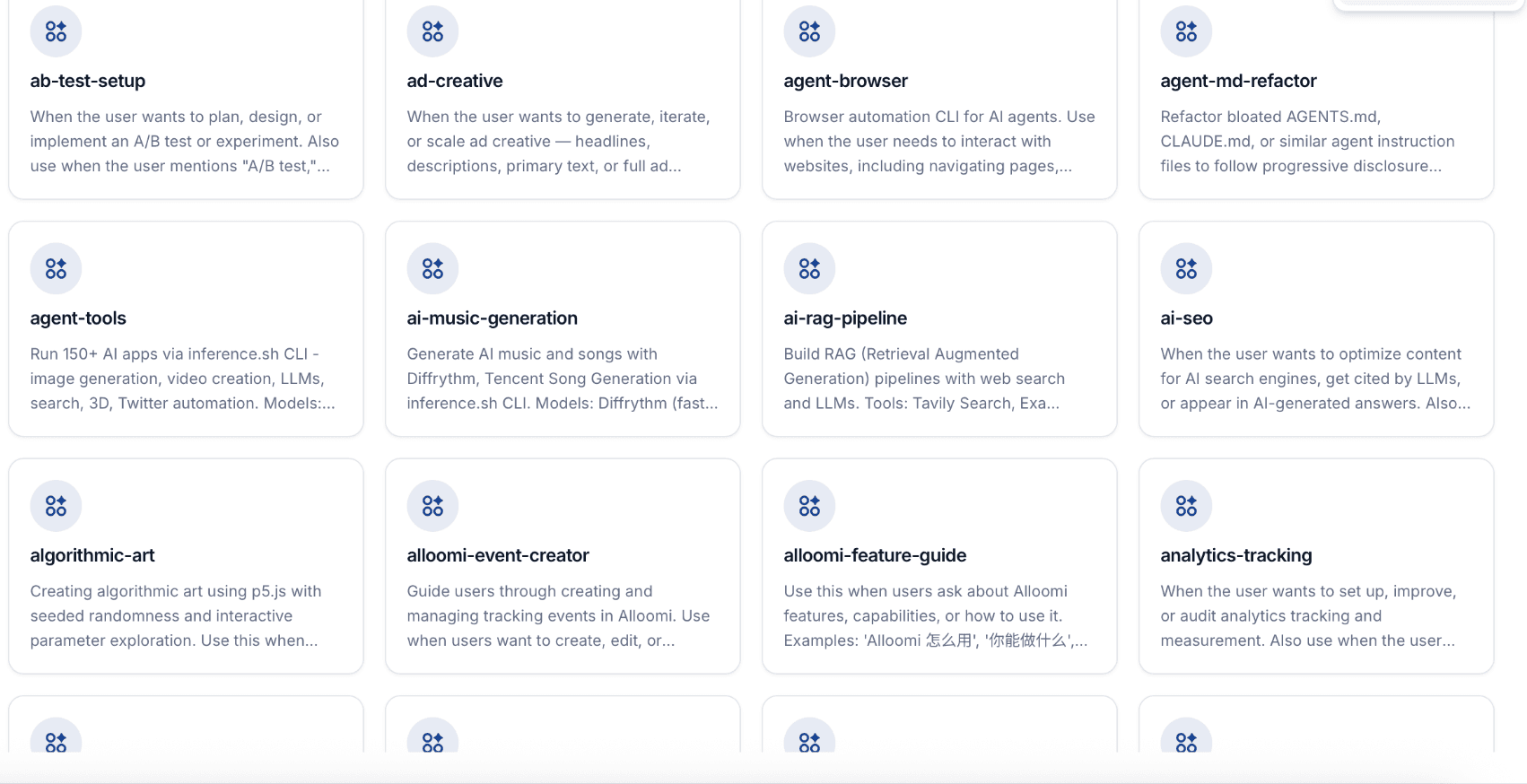
Builtin Skills covering every work scenario, continuously expanding. OpenLoomi's Skills ecosystem extends your execution capabilities infinitely.
What Are Skills?
Skills are specialized capabilities that OpenLoomi uses to accomplish specific tasks. From code generation to PDF creation, data analysis to browser automation—Skills give OpenLoomi the tools to get things done.
Builtin Skills Available — with more added every week.
Available Skills Categories
| Category | Skills |
|---|---|
| 💻 Development | Code Generation, Code Review, Bug Detection, API Documentation, Database Design |
| 📊 Data & Analytics | Data Analysis, Data Visualization, Report Generation, Excel/PDF Reports, Statistical Analysis |
| 📄 Documents | Document Creation, PDF Generation, PPT Creation, Contract Drafting, Content Writing |
| 🌐 Web Automation | Browser Automation, Web Scraping, Form Filling, Data Extraction, UI Testing |
| 🎨 Creative | Image Generation, AI Music, Video Creation, Thumbnail Design, Social Media Content |
| 🔍 Research | Deep Research, Competitor Analysis, Market Research, Trend Analysis, Summarization |
How Skills Work
When you give OpenLoomi a task, it automatically:
- Understands your intent — analyzes what you're trying to accomplish
- Selects appropriate Skills — chooses the right tools for the job
- Chains execution — combines multiple Skills when needed
- Validates results — ensures the output meets your requirements
"Create a competitive analysis for our Q1 launch"
OpenLoomi uses: Web Research → Data Analysis → Report Generation → PPT Creation
All automatically. No manual Skill selection needed.
Build Your Own Skills
Create custom Skills and share them with the community. Build specialized workflows tailored to your specific needs.
To get started, type /skill-creator in any chat.
Open Sourced Skills
OpenLoomi's core capabilities are packaged as standalone, open-source Skills. Integrate them into any Agent that supports MCP — Claude Code, Codex, OpenClaw, Hermes, and more.
Install via Skills.sh
For agents that consume the skills.sh skill protocol, install the OpenLoomi skill set directly from this repository:
npx skills add https://github.com/melandlabs/openloomi/tree/main/skills \
  --skill openloomi openloomi-setup openloomi-memory openloomi-connectors openloomi-loop openloomi-goals openloomi-api openloomi-feature-guide composio \
  -y
Start with the openloomi or openloomi-setup skill — it verifies the local OpenLoomi runtime is reachable and walks you through first-use setup. For other runtimes, see the Plugins page.
What's included
| Skill | Description |
|---|---|
| openloomi (GitHub) | OpenLoomi entrypoint for skill-only agent runtimes without a plugin mechanism. Routes requests to the right narrow skill — setup, memory, connectors, Loop, API, or feature guide |
| openloomi-setup (GitHub) | First-use setup and readiness guidance. Checks whether OpenLoomi Desktop is installed, the local API is reachable, and ~/.openloomi/token exists — points to next manual step if not |
| openloomi-memory (GitHub) | Search memory files, knowledge base, and chat insights. Memory search, knowledge base, documents, insights |
| openloomi-connectors (GitHub) | Manage the 7 native messaging-platform connectors (Telegram, WhatsApp, iMessage, Lark/Feishu, DingTalk, QQ, WeChat) — list accounts, connect, disconnect, query contacts, send messages. Slack / Gmail / GitHub / Notion / etc. live in the paired composio skill |
| openloomi-api (GitHub) | OpenLoomi REST API reference — 131 routes across 36 modules (auth, AI, RAG, memory, loop, integrations, workspace, platform callbacks) |
| openloomi-loop (GitHub) | Proactive execution brain — pulls signals from Gmail/Calendar/GitHub/Slack via Composio MCP, enriches through openloomi-memory, classifies into typed decisions, and executes via Claude Code |
| openloomi-goals (GitHub) | Read-only access to durable Goals — list active Goals across chats or inspect one Goal's steps and progress without changing its lifecycle |
| openloomi-feature-guide (GitHub) | Explain OpenLoomi concepts, product capabilities, and user workflows. Glossary (Loop, Signal, Decision, Card, ActionKind, Attention Agent, Connector, Memory, Plugin, Composio) and usage answers |
| composio (GitHub) | Access 1000+ external apps (Gmail, Slack, GitHub, Notion, Linear, Jira, HubSpot, Asana, …) via the Composio CLI — search tools, link accounts, execute actions, listen for triggers |
These Skills are open-source under Apache 2.0. Fork them, extend them, or integrate them into your own Agent workflow.
openloomi
Front door for skill-only runtimes. The entrypoint that routes requests to the right narrow OpenLoomi skill — no plugin required.
The openloomi skill is the starting point for agents that can load skills but do not have an OpenLoomi plugin (for example WorkBuddy and other skill-capable agents). It does not call the desktop runtime itself — it tells the agent which narrow skill to invoke next.
When to Use
- 🧭 First touch with OpenLoomi in a runtime that has no plugin — start here, then jump to openloomi-setup if readiness is unknown
- 🔀 Routing — when a request could land on memory, connectors, Loop, API, or feature-guide,
openloomipicks the right one - 🧱 Composition — chain setup → memory → connectors (or composio) without re-implementing OpenLoomi logic in the agent
Boundaries
- ❌ Does not store anything itself — that's openloomi-memory
- ❌ Does not connect platforms — that's openloomi-connectors
- ❌ Does not judge signals — that's openloomi-loop
- ❌ Does not duplicate OpenLoomi business logic inside the agent — use the narrow skills
Reference
- Full routing guide: openloomi SKILL.md on GitHub
- Source code:
skills/openloomi/ - Apache 2.0 license — fork it, extend it, integrate it.
openloomi-setup
Readiness in one CLI call. Verifies that OpenLoomi Desktop is installed, the local API is up, and a token exists — surfaces the next manual step when anything is missing.
The openloomi-setup skill is what an agent runs first when OpenLoomi readiness is unknown. It is intentionally lightweight and manual-first — it never asks the user to paste tokens or API keys into chat.
When to Use
- 🩺 Pre-flight check before any other OpenLoomi skill — confirms Desktop installed, local API reachable on
3414/3515,~/.openloomi/tokenpresent - 🧭 Recovery guidance — when readiness is false, returns the
nextActionand the official Getting Started link - 🚪 Handoff contract — once
ready: true, hand off to openloomi-memory, openloomi-connectors, openloomi-loop, or openloomi-api
Quick Start
node "$SKILL_DIR/scripts/openloomi-setup.cjs" statusExpected output:
{
  "ready": true,
  "desktopInstalled": true,
  "localApiReachable": true,
  "tokenPresent": true,
  "nextAction": "ok"
}
If ready is false, surface the returned nextAction and the official install path (https://openloomi.ai/docs/getting-started) instead of guessing.
Boundaries
- ❌ Does not install OpenLoomi Desktop — direct the user to official docs
- ❌ Does not refresh tokens or run OAuth flows — that's the desktop app's job
- ❌ Does not store secrets in chat — tokens and API keys stay on the user's machine
Reference
- Full setup guide: openloomi-setup SKILL.md on GitHub
- Source code:
skills/openloomi-setup/ - Apache 2.0 license — fork it, extend it, integrate it.
openloomi-memory
Three stores, one CLI. Personal markdown notes, uploaded documents (RAG), and AI-extracted insights from chat history — searchable, writable, and composable from any MCP-compatible Agent.
The openloomi-memory skill exposes OpenLoomi's memory capabilities to any Agent that supports MCP — Claude Code, Codex, OpenClaw, Hermes, and more. Memory is the single source of truth for openloomi-loop, which delegates all of its reads and writes here.
For the deep system architecture (tiered storage, the forgetting engine, scoring formulas, the time-travel / Hebbian-connection subsystems), see the Memory deep-dive.
When to Use Memory
- 🔍 "What did I decide about X?" — semantic + keyword search across files, knowledge base, and insights in one call
- 🧠 Entity resolution — "Is 'John' the same person as 'John Doe'?" via the entity registry
- ⏰ Time-travel queries — "What was the project status on March 1st?"
- 🔗 Living connections — "What other things do I usually look at when I look at this?"
- 📝 Write-back from any agent — Claude Code running a task can persist findings to memory with one CLI call
- 📚 Document RAG — semantic search over uploaded PDFs / DOCX / Notion exports
It is not designed for:
- ❌ Real-time search — the local-filesystem search is sub-second; the knowledge-base / insights APIs hit the cloud and have network latency
- ❌ Per-message storage — that's openloomi-connectors's job; memory ingests the extracted insights that come from connector sync
- ❌ Replacing a vector database — the skill is a thin wrapper; for high-volume / high-cardinality workloads you want a dedicated store
The Three Memory Types
| Type | What it is | Where it lives | Search style |
|---|---|---|---|
| Memory Files | Personal markdown / JSON notes | ~/.openloomi/data/memory/ (local) | Case-insensitive full-text |
| Knowledge Base | User-uploaded documents (PDF, DOCX, MD, …) | OpenLoomi server (RAG / embeddings) | Semantic similarity |
| Insights | AI-extracted structured records (decisions, action items, notes, preferences) | OpenLoomi server (indexed) | Structured query + temporal |
~/.openloomi/data/memory/         # Memory Files (local)
├── chats/                        #   exported conversations
├── channels/                     #   per-channel memory (telegram, gmail, …)
├── people/                       #   person profiles
├── projects/                     #   project notes
├── notes/                        #   general notes
└── strategy/                     #   strategy documents
The three stores are independent — pick the one that matches your query, or use search-all to query them in parallel.
Quick Start
Prerequisites
- Node.js 18+
- Claude Code (or any MCP-compatible Agent) installed
- A valid token at
~/.openloomi/token(auto-decoded by the CLI)
Step 1 — Comprehensive search across all three stores
node $SKILL_DIR/scripts/openloomi-memory.cjs search-all "Q2 launch"Expected output (abbreviated):
{
  "query": "Q2 launch",
  "files": {
    "results": [
      {
        "file": "projects/q2-launch.md",
        "line": 12,
        "preview": "Q2 launch date: June 15, blocked on legal review"
      }
    ],
    "total": 1
  },
  "knowledge": {
    "results": [
      {
        "id": "doc_abc",
        "title": "Q2 Launch Plan.pdf",
        "score": 0.91,
        "preview": "..."
      }
    ],
    "total": 1
  },
  "insights": {
    "results": [
      {
        "id": "ins_xyz",
        "type": "decision",
        "content": "Team agreed to push Q2 launch by one week",
        "time": "2026-04-12T..."
      }
    ],
    "total": 1
  }
}
Step 2 — Search a specific store
# Local files only
node $SKILL_DIR/scripts/openloomi-memory.cjs search-memory "launch" --directory=projects

# Knowledge base only
node $SKILL_DIR/scripts/openloomi-memory.cjs search-knowledge "launch plan"

# Recent insights from a specific channel
node $SKILL_DIR/scripts/openloomi-memory.cjs list-insights --channel=slack --days=7
Step 3 — Write back from an agent
# Add a memory file
node $SKILL_DIR/scripts/openloomi-memory.cjs add-memory "Sarah prefers async standups; runs 2x/week" --file=people/sarah_chen.md

# Add a structured insight
node $SKILL_DIR/scripts/openloomi-memory.cjs add-insight \
  --title="Q2 launch pushed to June 22" \
  --description="Legal review needs one more week" \
  --importance=High \
  --urgency=Urgent \
  --groups=gmail,slack \
  --people="Sarah Chen,Marcus Webb"
Step 4 — Verify
node $SKILL_DIR/scripts/openloomi-memory.cjs search-all "Q2 launch June 22"You should see your newly written memory file and the new insight both in the results.
Scenario Walkthrough: "Who is Sarah and what do we have on her?"
This is the kind of compound query an agent runs dozens of times a day: combine entity lookup, file search, and recent insights into a single context block.
Step 1 — Find the entity
node $SKILL_DIR/scripts/openloomi-memory.cjs list-entities --search=SarahExpected output:
{
  "entities": [
    {
      "id": "ent_sarah_chen",
      "type": "person",
      "name": "Sarah Chen",
      "aliases": ["Sarah", "sarah@acme.com"],
      "insightCount": 14
    }
  ],
  "total": 1
}
Step 2 — Pull the person note + related insights in one call
node $SKILL_DIR/scripts/openloomi-memory.cjs get-entity ent_sarah_chen --insightsExpected output:
{
  "entity": {
    "id": "ent_sarah_chen",
    "type": "person",
    "name": "Sarah Chen",
    "...": "..."
  },
  "insights": [
    {
      "id": "ins_1",
      "type": "action_item",
      "content": "Sarah to send Q2 review agenda by Mon",
      "time": "2026-06-23T..."
    },
    {
      "id": "ins_2",
      "type": "preference",
      "content": "Sarah prefers async standups",
      "time": "2026-05-10T..."
    }
  ]
}
Step 3 — Surface what else you usually look at with her
node $SKILL_DIR/scripts/openloomi-memory.cjs get-related-insights ins_1 --limit=5Expected output:
{
  "relatedInsights": [
    { "insightId": "ins_q2_review", "strength": 0.78, "coAccessCount": 6 },
    { "insightId": "ins_acme_kickoff", "strength": 0.61, "coAccessCount": 4 }
  ]
}
This is the Living Connections subsystem — Hebbian-style "insights that fire together wire together." Strength grows when you view two insights within 5 minutes of each other; decays with the Ebbinghaus curve otherwise.
What you can now do
With three CLI calls you have: an entity record, the latest 2 action items / preferences tied to her, and the related-context suggestions. An agent can hand this whole block to a downstream task (drafting a reply, planning a meeting, etc.) without any further search.
Special Features
Time-Travel Queries
# What was relevant on a specific date?
node $SKILL_DIR/scripts/openloomi-memory.cjs get-insights-as-of 2026-03-01

# Currently-valid insights only (hide expired)
node $SKILL_DIR/scripts/openloomi-memory.cjs get-current-insights

# Insights active during an interval
node $SKILL_DIR/scripts/openloomi-memory.cjs get-insights-in-interval 2026-01-01 2026-06-01
Backed by the validFrom / validUntil fields on each insight. Useful for "what was my priority in Q3?" type queries.
Combined Search with Connections
node $SKILL_DIR/scripts/openloomi-memory.cjs search-with-connections "project deadline" --limit=5Returns matching insights plus their Living Connections, giving richer context in a single call.
Entity Registry
node $SKILL_DIR/scripts/openloomi-memory.cjs list-entities --type=person
node $SKILL_DIR/scripts/openloomi-memory.cjs list-entities --type=project
node $SKILL_DIR/scripts/openloomi-memory.cjs get-entity ent_sarah_chen --insights
Entity types: person · group · concept · project · company. Each entity has aliases for disambiguation (e.g. "Sarah" → "Sarah Chen" → sarah@acme.com).
Configuration
The CLI auto-reads your token from ~/.openloomi/token (base64-encoded JWT) — no manual auth steps.
The Memory Files search is configured by convention — subdirectories under ~/.openloomi/data/memory/ are searched recursively (max depth 5), and only .md / .json files are scanned. No flags needed.
For RAG, the search threshold is 0.7 cosine similarity by default; limit defaults to 5 results.
Companion Skills
| When you want… | Use |
|---|---|
| Proactive decisions from new signals | openloomi-loop (delegates all memory I/O here) |
| Connect a platform so memory can ingest it | openloomi-connectors |
| Server-side API for the same memory stores | openloomi-api |
The Memory skill is the memory layer. The Loop is the proactive executor. The two compose: every tick in the Loop enriches via memory and writes back via memory.
REST API (Optional)
For programmatic access from non-MCP environments, the same capabilities are exposed via the local server on port 3414:
| Endpoint | Purpose |
|---|---|
POST /api/rag/search | Semantic search across knowledge-base documents |
GET /api/rag/documents | List uploaded documents |
GET /api/insights?days=7&channel=… | List insights (filterable by channel & date) |
POST /api/insights | Create a new insight |
PUT /api/insights/[id] | Partial update (arrays append, not replace) |
GET /api/insights/analytics | Usage analytics + value-score leaderboard |
POST /api/insights/[id]/view | Record a view (feeds the scoring formula) |
All endpoints require Authorization: Bearer $TOKEN where $TOKEN is the base64-decoded JWT from ~/.openloomi/token. See openloomi-api for the full reference.
Reference
- Full CLI / API reference: openloomi-memory SKILL.md on GitHub
- System architecture (data model, forgetting engine, scoring): Memory deep-dive
- Source code:
skills/openloomi-memory/ - Apache 2.0 license — fork it, extend it, integrate it.
openloomi-connectors
7 native messaging bots, plus the OAuth layer for ~1000+ more. This skill covers the platforms OpenLoomi maintains directly. Slack, Gmail, GitHub, Notion, and the rest live behind the paired composio skill.
The openloomi-connectors skill exposes OpenLoomi's native platform-integration layer to any Agent that supports MCP. OpenLoomi ships connectors through two layers — keep them straight:
- Native (this skill) — 7 messaging-platform bots maintained directly by OpenLoomi: Telegram, WhatsApp, iMessage, Lark/Feishu, DingTalk, QQ, WeChat. CLI covers OAuth / app-credential / QR / interactive setup, list, status, disconnect, contact query, and message send.
- Composio (paired
composioskill) — a hosted OAuth broker that authorizes ~1000+ apps including Slack, Discord, X, Gmail, Outlook, Google Calendar/Drive/Docs, GitHub, Notion, Linear, HubSpot, LinkedIn, Jira, Asana. Composio handles "is this user authorised?"; OpenLoomi's Loop channels consume the events as Signals.
When the user asks "what am I connected to?" or "list my accounts", run both — list-accounts here and the composio connection listing — and present the union. This skill is the doorway through which openloomi-memory ingests raw messages and through which openloomi-loop pulls fresh signals.
For the full per-platform setup walkthroughs (Lark/Feishu permission lists, DingTalk Stream mode, iMessage macOS permissions, etc.), see the Connectors deep-dive.
When to Use Connectors
- 🔌 Connect a native platform — Telegram, WhatsApp, iMessage, Lark/Feishu, DingTalk, QQ, or WeChat
- 🔗 Connect an OAuth-backed platform (Slack, Gmail, GitHub, Notion, …) — use the paired composio skill instead
- 📋 List connected accounts — see what's already linked, get the
botIdyou need to send from - 🩺 Check status — is a platform connected, expired, or disconnected?
- 🔌 Disconnect — revoke access for one account
- 👤 Query contacts — paginated, name-filtered contact lookup
- ✉️ Send a message — from any connected bot, with recipient resolution
It is not designed for:
- ❌ Per-message read access from an agent — that's the openloomi-api
/api/messagesroute; this skill is for account management + bot messaging - ❌ Real-time event subscription — the connectors sync on a schedule; if you need push-style events, use the platform's native webhook or the openloomi-loop tick
- ❌ Building a customer-facing bot from scratch — for that, set up the platform's bot credentials and point them at OpenLoomi's listener endpoints (see Connectors deep-dive → Feishu setup)
Supported Platforms (7 native)
The CLI list-platforms returns these 7 native platforms. Other connectable platforms (Slack, Discord, X, Gmail, Outlook, LinkedIn, Google Calendar / Drive / Docs, HubSpot, Notion, GitHub, Linear, Asana, Jira, etc.) are managed via the desktop UI or the composio skill — see "Connection Methods" below.
| ID | Display Name | Auth method |
|---|---|---|
telegram | Telegram | QR / Phone (browser) |
whatsapp | QR / Pair code (browser) | |
imessage | iMessage | Local (macOS only, browser) |
feishu | Lark / Feishu | App Credentials (App ID + Secret) |
dingtalk | DingTalk | App Credentials (Client ID + Secret) |
qqbot | App Credentials (App ID + Token) | |
weixin | iLink Token |
Aliases are supported (case-insensitive, English + Chinese): tg → telegram, lark / 飞书 → feishu, 钉钉 → dingtalk, wechat / 微信 → weixin, etc.
Quick Start
Prerequisites
- Node.js 18+
- Claude Code (or any MCP-compatible Agent)
- A valid token at
~/.openloomi/token(auto-decoded by the CLI) - The local API server reachable at
http://localhost:3414(fallback:3515)
Step 1 — See what's available
node $SKILL_DIR/scripts/openloomi-connectors.cjs list-platformsExpected output (truncated):
{
  "platforms": [
    { "id": "telegram", "displayName": "Telegram", "aliases": ["tg"] },
    { "id": "whatsapp", "displayName": "WhatsApp", "aliases": [] },
    { "id": "imessage", "displayName": "iMessage", "aliases": [] },
    {
      "id": "feishu",
      "displayName": "Lark/Feishu",
      "aliases": ["lark", "飞书"]
    },
    { "id": "dingtalk", "displayName": "DingTalk", "aliases": ["钉钉"] },
    { "id": "qqbot", "displayName": "QQ", "aliases": ["qq", "qq_bot"] },
    { "id": "weixin", "displayName": "WeChat", "aliases": ["wechat", "微信"] }
  ],
  "total": 7
}
💡 For Slack / Gmail / GitHub / Notion / Linear / HubSpot / Jira / Asana / Google Calendar / Drive / Docs, use the paired
composioskill — those live in the Composio OAuth layer.
Step 2 — See what's already connected
node $SKILL_DIR/scripts/openloomi-connectors.cjs list-accountsExpected output:
{
  "accounts": [
    {
      "id": "int_feishu_001",
      "platform": "feishu",
      "externalId": "cli_xxx",
      "displayName": "Acme Workspace Bot",
      "status": "active",
      "botId": "bot_feishu_001"
    },
    {
      "id": "int_telegram_001",
      "platform": "telegram",
      "externalId": "+15551234567",
      "displayName": "Personal Telegram",
      "status": "active",
      "botId": "bot_telegram_001"
    }
  ],
  "total": 2
}
💡 Note
botId: it is different from the accountid. You'll needbotIdto send messages. To see OAuth-backed accounts (Slack, Gmail, GitHub, …), use thecomposioskill.
Step 3 — Connect a new platform
# QR scan — CLI opens the browser
node $SKILL_DIR/scripts/openloomi-connectors.cjs connect telegram

# App Credentials
node $SKILL_DIR/scripts/openloomi-connectors.cjs connect feishu --appId=cli_xxx --appSecret=xxx

# iLink Token
node $SKILL_DIR/scripts/openloomi-connectors.cjs connect weixin --token=xxx
Expected output (App Credentials):
→ Verifying app credentials with feishu open platform…
✓ Authorization received
✓ Account int_feishu_002 created (botId=bot_feishu_002)
Step 4 — Send a message
node $SKILL_DIR/scripts/openloomi-connectors.cjs send-reply \
  --botId=bot_feishu_002 \
  --recipients=John \
  --message="Heads up — Q2 review tomorrow at 10am."
Expected output:
{
  "success": true,
  "messageId": "msg_abc123",
  "deliveredAt": "2026-08-04T10:00:00Z"
}
Scenario Walkthrough: Connect Feishu and send a message to John
Step 1 — Check whether Feishu is already connected
node $SKILL_DIR/scripts/openloomi-connectors.cjs status feishuExpected output:
{ "platform": "feishu", "connected": false, "accounts": [] }Step 2 — Connect it
node $SKILL_DIR/scripts/openloomi-connectors.cjs connect feishu --appId=cli_xxx --appSecret=xxxThis calls Feishu's open platform to verify the app credentials. Once verified, the CLI prints the new account ID and botId. The app must be published in the Feishu admin console before messages can reach end users (see Connectors deep-dive → Feishu setup for the full publish step).
Expected output:
→ Verifying app credentials with feishu open platform…
✓ Authorization received
{
  "accountId": "int_feishu_002",
  "botId": "bot_feishu_002",
  "appId": "cli_xxx",
  "scopes": ["im:message", "im:message.group_at_msg", "contact:user.id:readonly", ...]
}
Step 3 — Find John's contact record
node $SKILL_DIR/scripts/openloomi-connectors.cjs query-contacts --name=John --pageSize=5Expected output:
{
  "contacts": [
    {
      "id": "contact_001",
      "name": "John Doe",
      "type": "feishu",
      "botId": "bot_feishu_002"
    },
    {
      "id": "contact_002",
      "name": "John Smith",
      "type": "feishu",
      "botId": "bot_feishu_002"
    }
  ]
}
⚠️ Disambiguation: with two Johns, you'll need to pick the right one — either by checking the contact
idor by passing the full name. The CLI does not auto-resolve.
Step 4 — Send
node $SKILL_DIR/scripts/openloomi-connectors.cjs send-reply \
  --botId=bot_feishu_002 \
  --recipients="John Doe" \
  --message="Heads up — Q2 review tomorrow at 10am."
Expected output:
{
  "success": true,
  "messageId": "msg_xyz789",
  "channel": "oc_xxx",
  "deliveredAt": "2026-08-04T10:01:23Z"
}
The message lands in John Doe's Feishu DM, sent by the OpenLoomi bot.
Step 5 (optional) — Disconnect later
node $SKILL_DIR/scripts/openloomi-connectors.cjs disconnect int_feishu_002Expected output:
{
  "success": true,
  "deletedAccountId": "int_feishu_002",
  "deletedBotIds": ["bot_feishu_002"]
}
Connection Methods by Platform
The CLI normalizes four different platform auth models for the 7 native platforms:
| Method | Platforms | Flow |
|---|---|---|
| App Credentials | feishu, dingtalk, qqbot | Pass --appId + --appSecret (or --clientId + --clientSecret) |
| iLink Token | weixin | Pass --token |
| Browser required | whatsapp, telegram, imessage | CLI opens browser for QR scan / interactive auth |
For feishu / dingtalk / qqbot, the app must be published in the platform's admin console before messages can reach it — see the Connectors deep-dive → Feishu setup for the full publish step.
For the OAuth-backed apps (Slack, Discord, X, Gmail, Outlook, LinkedIn, Google Calendar / Drive / Docs, GitHub, HubSpot, Notion, Linear, Jira, Asana, Teams, Facebook Messenger, …), use the paired composio skill.
Command Reference
| Command | Purpose |
|---|---|
list-platforms | List all 7 native platforms with IDs and aliases |
list-accounts | List all native connected accounts (includes botId per account); pair with composio for the OAuth-backed layer |
status <platform> | Check if a platform is connected |
connect <platform> [flags] | Connect a platform (auth-method-aware) |
disconnect <accountId> | Disconnect a specific account by ID |
query-contacts [--name=] [--page=] | Paginated, name-filtered contact lookup |
send-reply --botId= --recipients= --message= | Send a message via a connected bot |
Companion Skills
| When you want… | Use |
|---|---|
| Persist ingested messages / search memory | openloomi-memory |
| Pull signals from connected accounts proactively | openloomi-loop |
| Server-side access to the same integration data | openloomi-api |
Connector accounts feed two downstream skills: the memory skill receives synced messages and extracts insights, and the loop skill polls the accounts for fresh signals to classify. Both are read paths — they do not call the connectors CLI directly.
REST API (Optional)
For non-MCP environments, the same operations are exposed via the local API on port 3414:
| Endpoint | Purpose |
|---|---|
GET /api/integrations/accounts | List connected accounts |
GET /api/integrations/slack/oauth/start | Get the Slack OAuth URL |
GET /api/integrations/slack/oauth/exchange | Exchange OAuth code → account |
GET /api/contacts?name=…&page=… | Query contacts |
POST /api/messages | Send a message via a connected bot |
DELETE /api/integrations/:id | Disconnect an account |
Each platform also has its own callback / listener init endpoint — see the Connectors deep-dive or openloomi-api for the full list.
Reference
- Full CLI / API reference + desktop UI walkthrough: openloomi-connectors SKILL.md on GitHub
- Per-platform setup walkthroughs (screenshots, permission lists): Connectors deep-dive
- Source code:
skills/openloomi-connectors/ - Apache 2.0 license — fork it, extend it, integrate it.
openloomi-api
131 route handlers, 36 modules, one base URL. Auth, AI, files, RAG, integrations, memory, loop, pet, workspace, platform callbacks — all the same OpenLoomi server your desktop app talks to, exposed as a REST API for any Agent to drive.
The openloomi-api skill is the open-source server-side reference for OpenLoomi's backend. It is the lowest-level of the open-source stack — the memory, connectors, and loop skills all eventually call into these endpoints, but you can call them directly when you need full control or want to build a custom integration.
For the full endpoint-by-endpoint reference (all 131 routes across 36 modules, request/response schemas), see the openloomi-api SKILL.md on GitHub.
When to Use the API
- 🤖 Drive OpenLoomi from your own Agent — Claude Code, Codex, custom bots — without installing the desktop app
- 🧠 Build a custom RAG pipeline — upload, chunk, embed, search documents against the same store the desktop app uses
- 💬 Stream chat completions — the same
/api/ai/chatendpoint the desktop chat UI uses - 🗂️ Manage workspace artifacts and skills — CRUD on
artifacts/,files/,skills/ - 🔍 Programmatic access to memory — read insights, record views, run analytics, query the entity registry
- 🪝 Programmatic access to Loop state — preferences, channels, decisions, classifier rules
- 🐾 Pet / attention-agent state — mirror, theme, pause/resume
It is not designed for:
- ❌ Webhooks from external services — those are platform-specific (Slack events, GitHub webhooks); OpenLoomi receives them via the connectors skill
- ❌ Long-running background jobs — the API is request/response; for that, use the loop skill which schedules ticks
- ❌ Direct database access — the API is the only supported surface; there is no public Postgres endpoint
Module Overview
The 36 modules split into 21 functional modules plus 12 platform-callback modules (one per platform). The functional modules:
| Module | Base Path | What it covers |
|---|---|---|
| Auth | /api/auth/*, /api/remote-auth/*, /api/remote-feedback/* | Guest session, token, user probe, feedback |
| AI | /api/ai/* | Chat, images, audio, embeddings |
| Audit | /api/audit/* | Audit log retrieval |
| Chat Insights | /api/chat-insights/* | Per-chat insight records |
| Chronicle | /api/chronicle/* | Meeting detection, analysis, memories |
| Contacts | /api/contacts/* | Contact query |
| DB Init | /api/db/* | Bootstrap database |
| Files | /api/files/* | File storage, upload, download |
| Insight Tabs | /api/insight-tabs/* | Tab CRUD + reorder |
| Integrations | /api/integrations/* | OAuth start/exchange + connected accounts |
| Listeners | /api/listeners/* | Listener cleanup |
| LLM Usage | /api/llm/* | Usage summary |
| Loop | /api/loop/* | Attention loop, decisions, channels, classifier rules |
| Markmap | /api/markmap/* | Markmap generation |
| Memory | /api/memory/* | Memory search, raw messages |
| Messages | /api/messages/* | Send, sync, status, raw |
| Native | /api/native/* | Native agent operations, providers, skills |
| Pet | /api/pet/* | Pet state mirror |
| Proxy | /api/proxy/* | CSS/JS proxy |
| RAG | /api/rag/* | Document upload, search, stats |
| Storage | /api/storage/* | Disk usage, sessions, cleanup |
| Workspace | /api/workspace/* | Artifacts, files, skills, previews |
The 12 platform-callback modules (/api/slack/*, /api/discord/*, /api/feishu/*, /api/dingtalk/*, /api/qqbot/*, /api/weixin/*, /api/telegram/*, /api/whatsapp/*, /api/imessage/*, /api/hubspot/*, /api/linkedin/*, /api/notion/*) handle listener init, message routing, and per-platform OAuth callbacks.
Authentication
Two surfaces, two auth styles:
| Surface | Auth | Use it from |
|---|---|---|
| Local desktop server | Authorization: Bearer $TOKEN | Claude Code / Tauri / scripts on your machine |
The token is stored at ~/.openloomi/token as a base64-encoded JWT. You must decode it before sending it as a Bearer token.
# Decode and stash in $TOKEN
TOKEN=$(cat ~/.openloomi/token | base64 -d)
⚠️ Common mistake: passing the raw base64 string to
Authorization: Bearerreturns401 Unauthorized. Always decode first.
Quick Start
Step 1 — Verify the local server is up
curl -s http://localhost:3414/api/ai/chatExpected output:
{ "status": "ok", "provider": "openai", "model": "gpt-4o-mini" }Step 2 — Get the current user
TOKEN=$(cat ~/.openloomi/token | base64 -d)
curl -s http://localhost:3414/api/remote-auth/user \
  -H "Authorization: Bearer $TOKEN"
Expected output:
{
  "id": "user_xxx",
  "email": "you@example.com",
  "name": "Your Name",
  "subscription": { "plan": "pro", "renewsAt": "2026-09-01T..." }
}
Step 3 — Stream a chat completion
TOKEN=$(cat ~/.openloomi/token | base64 -d)
curl -N -X POST http://localhost:3414/api/ai/chat \
  -H "Authorization: Bearer $TOKEN" \
  -H "Content-Type: application/json" \
  -d '{
    "messages": [
      {"role": "system", "content": "You are a helpful assistant."},
      {"role": "user", "content": "What did I decide about Q2?"}
    ],
    "stream": true
  }'
Expected output (SSE stream, truncated):
data: {"delta": "Based on your memory, "}
data: {"delta": "you decided to push "}
data: {"delta": "the Q2 launch to June 22."}
data: [DONE]
Step 4 — Search the knowledge base (RAG)
TOKEN=$(cat ~/.openloomi/token | base64 -d)
curl -X POST http://localhost:3414/api/rag/search \
  -H "Authorization: Bearer $TOKEN" \
  -H "Content-Type: application/json" \
  -d '{"query":"Q2 launch plan","limit":5}'
Expected output:
{
  "results": [
    {
      "id": "doc_abc",
      "title": "Q2 Launch Plan.pdf",
      "score": 0.93,
      "content": "Launch date: June 22, contingent on legal sign-off..."
    }
  ],
  "total": 1
}
The same endpoints, the same schemas — only the base URL changes.
Scenario Walkthrough: Build a custom RAG assistant
You have a folder of PDFs and want to query them from Claude Code. Here's the minimum viable flow.
Step 1 — Upload a document
TOKEN=$(cat ~/.openloomi/token | base64 -d)

# Initialize the upload
curl -X POST http://localhost:3414/api/rag/upload/init \
  -H "Authorization: Bearer $TOKEN" \
  -H "Content-Type: application/json" \
  -d '{"fileName":"q2-plan.pdf","contentType":"application/pdf","sizeBytes":482310}'
Expected output:
{
  "uploadId": "upl_abc",
  "chunkSize": 1048576,
  "totalChunks": 1
}
Step 2 — Stream the chunks
curl -X POST http://localhost:3414/api/rag/upload/chunk \
  -H "Authorization: Bearer $TOKEN" \
  -H "Content-Type: application/octet-stream" \
  --data-binary @q2-plan.pdf
Step 3 — Complete the upload and wait for embedding
curl -X POST http://localhost:3414/api/rag/upload/complete \
  -H "Authorization: Bearer $TOKEN" \
  -H "Content-Type: application/json" \
  -d '{"uploadId":"upl_abc"}'

# Poll until done
curl "http://localhost:3414/api/rag/upload/async/status?uploadId=upl_abc" \
  -H "Authorization: Bearer $TOKEN"
Expected output:
{
  "uploadId": "upl_abc",
  "status": "indexed",
  "documentId": "doc_xyz",
  "totalChunks": 47
}
💡 Tip: for files > 5 MB, prefer the
asyncvariant (POST /api/rag/upload/async) — the synchronous path can time out on large PDFs.
Step 4 — Query the new document
curl -X POST http://localhost:3414/api/rag/search \
  -H "Authorization: Bearer $TOKEN" \
  -H "Content-Type: application/json" \
  -d '{"query":"legal sign-off requirements","limit":3,"documentIds":["doc_xyz"]}'
Expected output:
{
  "results": [
    {
      "id": "chunk_012",
      "documentId": "doc_xyz",
      "content": "Legal sign-off required for: data processing addendum, IP disclosures...",
      "score": 0.88
    }
  ],
  "total": 1
}
You now have semantic search running against a PDF you just uploaded, available to any Agent that holds the same token.
Error Handling
All errors return standard HTTP status codes with a JSON body:
{
  error: string;      // human-readable message
  code?: string;      // programmatic code
  cause?: string;     // additional context
}| Code | Meaning | Typical cause |
|---|---|---|
| 200 | Success | — |
| 400 | Bad Request | Missing / invalid input |
| 401 | Unauthorized | Token missing, expired, or not base64-decoded |
| 403 | Forbidden | Insufficient permissions for this account |
| 404 | Not Found | ID does not exist |
| 429 | Too Many Requests | Rate limit hit |
| 500 | Internal Server Error | Server-side bug |
Highlights by Module
AI (/api/ai/*)
| Method | Endpoint | Use |
|---|---|---|
| POST | /api/ai/chat | Streaming chat completions |
| POST | /api/ai/v1/chat/completions | OpenAI-compatible chat |
| POST | /api/ai/v1/embeddings | Generate embeddings (1536-dim) |
| POST | /api/ai/v1/images/generations | Image generation |
| POST | /api/ai/v1/audio/speech | Text-to-speech |
| POST | /api/ai/v1/audio/transcriptions | Speech-to-text |
| GET | /api/ai/v1/models | List available models |
| POST | /api/ai/v1/messages/count_tokens | Token counting |
RAG (/api/rag/*)
| Method | Endpoint | Use |
|---|---|---|
| POST | /api/rag/search | Semantic document search |
| GET | /api/rag/documents | List documents |
| GET | /api/rag/documents/[id] | Get one document |
| GET | /api/rag/documents/[id]/binary | Download original file |
| POST | /api/rag/upload / upload/init / upload/chunk / upload/complete / upload/async | Document upload (chunked, resumable, async) |
| GET | /api/rag/stats | RAG statistics |
Integrations (/api/integrations/*)
| Method | Endpoint | Use |
|---|---|---|
| GET | /api/integrations/accounts | List connected accounts |
| GET | /api/integrations/slack/oauth/start | Begin Slack OAuth |
| GET | /api/integrations/slack/oauth/exchange | Complete Slack OAuth |
| GET | /api/integrations/discord/oauth/start | Begin Discord OAuth |
| GET | /api/integrations/x/oauth/start | Begin X OAuth |
| DELETE | /api/integrations/:id | Disconnect |
Plus platform-specific callbacks (Slack, Discord, Google, GitHub, Feishu, DingTalk, QQ, WeChat, Telegram, WhatsApp, iMessage) — see the openloomi-api SKILL.md for the full list.
Companion Skills
| When you want… | Use |
|---|---|
| Memory storage with structured CLI | openloomi-memory |
| Platform connection management | openloomi-connectors |
| Proactive decisions on top of API data | openloomi-loop |
The API is the foundation layer — every other open-source skill calls into it. When you need full control, low-level access, or to build a custom integration that doesn't fit the skill model, go straight to the API.
Reference
- Full endpoint reference (all 131 routes across 36 modules, schemas): openloomi-api SKILL.md on GitHub
- Local API base URL:
http://localhost:3414(fallback3515) - Token location:
~/.openloomi/token(base64-encoded JWT) - Source code:
skills/openloomi-api/ - Apache 2.0 license — fork it, extend it, integrate it.
openloomi-loop
Proactive & Continuous — watches your connected tools, classifies ambient signals into typed decisions, and queues them up the moment you look. Nothing fires automatically; everything is ready when you are.
OpenLoomi Loop is an open-source Claude Code skill that runs as the proactive execution brain on top of your existing tools. Instead of you remembering to check inbox, calendar, and PRs, the Loop watches them in the background, enriches each new signal with openloomi-memory, and turns it into a decision card you can act on in one click.
The Loop is not a daemon, not a cron job, and not a script. It is Claude, looping — every tick is a fresh claude -p invocation, every executed decision is a fresh claude -p session. Composable over persistent. Visible over magic.
When to Use Loop
The Loop shines when ambient signals need to become actions and the cost of missing them is real:
- 📥 Inbox triage — Sarah's email about "Q2 review tomorrow please RSVP" becomes a
email_replycard with her project context already attached. - 📅 Calendar RSVPs — A meeting invite where you haven't responded surfaces as an
rsvpcard with the organizer's last three notes already in the prompt. - 🔀 PR review queue — Every PR where you're a reviewer lands in the queue as a
review_prcard, with the diff stats and the last CI status. - 💬 Slack mentions — Messages that @mention you become
im_replycards with the thread context pre-loaded. - ✅ Assigned issues — GitHub issues assigned to you surface as
todocards, with prior discussion linked.
It is not designed for:
- ❌ Auto-sending emails or RSVPs without your approval — the tick is strictly read/derive. Execution is always on you.
- ❌ Replacing a real-time alert system — ticks run on a schedule (default every 10 min), not in real time.
- ❌ Bulk automation across many accounts — the Loop is single-user, single-tenant.
How It Works
Three layers, all agentic — no subprocess hacks, no local memory cache:
            ┌───────────────────────────────────────────────┐
            │                                               │
            ▼                                               │
   ┌──────────────┐    ┌──────────────┐    ┌───────────────┴──┐    ┌──────────────┐
   │  External    │───▶│   Context    │───▶│     Decision     │───▶│   Execute    │───▶ Output
   │ Environment  │    │    Layer     │    │      Layer       │    │    Layer     │
   │              │    │              │    │                  │    │              │
   │ Composio MCP │    │ signals.jsonl│    │ openloomi-memory │    │ spawn        │
   │ (gmail/cal/  │    │              │    │  enrichment      │    │   claude     │
   │  gh/slack)   │    │              │    │ + classifier     │    │ with prompt  │
   └──────────────┘    └──────┬───────┘    └────────┬─────────┘    └──────┬───────┘
                              │                     │                    │
                              ▼                     ▼                    ▼
                        openloomi-memory  (single source of truth:
people, projects, insights)| Layer | What it does | What it writes to |
|---|---|---|
| Pull | Claude calls Composio MCP tools in parallel to fetch fresh signals | data/signals.jsonl |
| Enrich | Each signal is enriched via openloomi-memory (sender lookup, project context, recent insights) | ~/.openloomi/data/memory/... |
| Classify | LLM assigns a typed action (rsvp, email_reply, review_pr, im_reply, todo) | data/decisions.json |
| Execute | You pick a card; Loop spawns a fresh claude -p with the full context | API calls (email, calendar, etc.) |
Hard rules run before the LLM and short-circuit: noreply@* senders, Gmail Promotions/Social/Forums/Updates/Spam labels, already-accepted calendar events, and already-replied emails are skipped without ever reaching the classifier.
Quick Start
Prerequisites
- Node.js 18+
- Claude Code installed and on
PATH(claude --versionshould work) - Composio MCP connected for at least one toolkit (Gmail, Google Calendar, GitHub, or Slack) — or use the manual
injectpath for testing without connections - openloomi-memory installed (the Loop delegates all memory reads/writes to it)
Step 1 — Drop a test signal (no Composio needed)
echo '{"source":"gmail","type":"email","payload":{"from":"Sarah <sarah@acme.com>","subject":"Q2 review tomorrow please RSVP","labels":["INBOX"]}}' \
  | node $SKILL_DIR/scripts/openloomi-loop.cjs inject -
This drops a synthetic email signal into data/inbox/. The Loop will ingest it on the next analyze.
Step 2 — Run the lib-level analyze
node $SKILL_DIR/scripts/openloomi-loop.cjs analyzeExpected output (approximate):
ingested 1 signal
classified:
  dec_a1b2c3d4  rsvp         conf 0.60  "Q2 review tomorrow please RSVP"
If Sarah is already in your openloomi-memory, confidence will be 0.85; otherwise 0.60.
Step 3 — Browse the decision queue
node $SKILL_DIR/scripts/openloomi-loop.cjs inbox           # plain list
node $SKILL_DIR/scripts/openloomi-loop.cjs inbox --pick    # arrow-key picker
Expected output:
PENDING (1)
  dec_a1b2c3d4  rsvp   conf 0.85  Q2 review tomorrow please RSVP  ← from Sarah
  └─ 👤 Sarah Chen (people/sarah_chen.md)  ·  🧠 2 prior interactions
Step 4 — Run the decision
node $SKILL_DIR/scripts/openloomi-loop.cjs run dec_a1b2c3d4This spawns a fresh claude -p session with the full decision context. The spawned session will:
- Confirm what it's about to do in one line
- Take the action (send the RSVP, draft the reply, etc.)
- Write any new people/projects back to openloomi-memory
- Summarize in 3 bullets: what changed, what was written to memory, follow-ups
On exit, the decision is moved from pending → done in data/decisions.json.
Step 5 (optional) — Schedule continuous ticks
node $SKILL_DIR/scripts/openloomi-loop.cjs schedule --interval 600Runs in the foreground with two independent timers: a tick every 600 seconds and a watch every 5 seconds for desktop notifications on new pending decisions. A hung tick never blocks notifications — the tick is hard-killed after LOOP_CLAUDE_TIMEOUT_MS (default 6 min).
Scenario Walkthrough: Triage a PR Review Request
A teammate opens a PR on a repo where you're a reviewer. Here's what the Loop does, end to end.
Input — the raw signal
{
  "source": "github",
  "type": "github_pr",
  "payload": {
    "repo": "acme/api",
    "number": 482,
    "title": "Refactor auth middleware",
    "state": "open",
    "user_is_reviewer": true
  }
}
Process — what the tick does
- Enrich: Loop calls openloomi-memory →
search-all "auth middleware"→ finds your prior review of PR #401 with notes on the JWT validation pattern. - Filter: PR is open, you're a reviewer, not a draft → passes hard rules.
- Classify: LLM sees a PR with a reviewer assignment → assigns
type: review_pr,confidence: 0.85(you're in memory as the reviewer). - Queue: Decision written to
data/decisions.json.
Output — the decision card (Web UI)
Open http://127.0.0.1:3414/ (run loop web if not already running):
┌──────────────────────────────────────────────────────────────┐
│ review_pr  ·  conf 0.85                          dec_x7y8z9w  │
├──────────────────────────────────────────────────────────────┤
│ ⏰ opened 2h ago  ·  🔀 acme/api#482                        │
│ Refactor auth middleware                                       │
│                                                               │
│ 👤 Reviewer: you                                              │
│ 🧠 memory:  projects/auth_rewrite.md  (prior review PR #401)  │
│                                                               │
│ Action: github_review                                         │
│   repo: acme/api  pr: 482  event: REQUEST_CHANGES  body: ...  │
│                                                               │
│ [▶ RUN]  [DRY RUN]  [✓ DONE]  [✕ DISMISS]                     │
└──────────────────────────────────────────────────────────────┘
What "RUN" actually does
loop run dec_x7y8z9w builds a prompt like:
You are executing an openloomi Loop decision. The user picked this from a proactive suggestion list.

DECISION TYPE: review_pr
TITLE: Review: Refactor auth middleware (acme/api#482)
CONFIDENCE: 0.85

WHY THIS SURFACED:
- Source: github:github_pr
- You're listed as a reviewer on this PR
- PR is open and awaiting review

MEMORY REFS (openloomi-memory):
- projects/auth_rewrite.md  (your prior notes on the JWT validation pattern)

SOURCE SIGNAL (github:github_pr):
{ ...full PR payload... }

SUGGESTED ACTION:
{ "kind": "github_review", "params": { "repo": "acme/api", "pr": 482, "event": "REQUEST_CHANGES", ... } }

Execute this action now. Steps:
1. Confirm what you're about to do in one line.
2. Take the action (read files, draft replies, update tasks — whatever the action calls for).
3. When done, summarize in 3 bullets: what changed, what was written to memory, follow-ups.
4. If any step is destructive or sends externally, STOP and ask the user to confirm before continuing.
It then spawns claude -p "<prompt>" and inherits stdio, so you see Claude's output directly. On exit, the decision moves to done with a result payload recording the action taken.
⚠️ Known issue:
loop runcannot be invoked from inside another interactive Claude Code session (nested sessions share runtime resources). If you are already in Claude Code, either runloop run --dryto read the prompt and execute the action yourself with Composio MCP tools, or spawn the run from a fresh shell. See the GitHub SKILL.md → Running a Decision for the full workaround.
Decision Types
| Type | Trigger | Suggested action |
|---|---|---|
rsvp | Calendar event with my_response: needsAction | calendar_rsvp |
email_reply | Email matching meeting/RSVP/invite patterns, or with action verbs from a known person | email_reply |
review_pr | GitHub PR where you're a reviewer | github_review |
todo | GitHub issue assigned to you, open | todo |
im_reply | Slack message that mentions you | im_reply |
Confidence is 0.85 when the sender is in openloomi-memory (known contact), else 0.60.
Configuration
Defaults are tuned for a low-noise, high-signal queue. Adjust via loop config set:
loop config set intervalSec 600           # tick frequency (default 10 min)
loop config set maxSignals 5000           # cap on signals.jsonl
loop config set maxDecisions 500          # cap on decisions.json
loop config set autoRun false             # always false — execution is user-driven
loop config set noReplySkip true          # skip noreply@* senders
loop config set promotionSkip true        # skip Gmail Promotions/Social/Forums/Updates/Spam
loop config set enableSources.file false  # disable manual inbox/ injection
Environment variables:
| Var | Default | Effect |
|---|---|---|
LOOP_CLAUDE_BIN | claude | Binary invoked for claude -p ... |
LOOP_CLAUDE_TIMEOUT_MS | 360000 (6 min) | Hard timeout for one tick's claude -p child |
LOOP_CLAUDE_SAFE_PERMISSIONS | (unset) | Set to 1 to opt out of --dangerously-skip-permissions |
LOOP_WEB_PORT | 3414 | Default port for loop web |
LOOP_NOTIFY_WEBHOOK | (unset) | Slack-compatible webhook URL for notification fan-out |
Companion Skills
| When you want… | Use |
|---|---|
| API endpoint reference | openloomi-api |
| Connect / manage a platform | openloomi-connectors |
| Search / write memory | openloomi-memory (delegated target) |
The Loop is the proactive executor; openloomi-memory is the memory layer. The Loop never owns its own memory — it asks openloomi-memory for every enrich and every writeback.
Web UI — loop web
loop web starts a local server at http://127.0.0.1:3414/ with three views:
- Q Queue — 3-column kanban (PENDING / DONE / DISMISSED). Click a card for the full decision detail and action buttons.
- T Timeline — Canvas graph of decisions as hex nodes, positioned by time and grouped by type. Pan / zoom.
- A Activity — Split view: live
notifications.logfeed (left) + recent decisions (right). Auto-refreshes every 4s.
Keyboard: Q / T / A switch views · / open search · ↑↓ navigate · Enter run selected · Esc close.
REST API (CORS-enabled, returns JSON):
GET  /api/state                counts, last tick, status
GET  /api/decisions            { pending, done, dismissed }
GET  /api/decision/:id         full decision + bucket
GET  /api/signals?limit=50     tail of signals.jsonl
GET  /api/notifications?limit=50  tail of notifications.log
GET  /api/memory?path=<rel>    read ~/.openloomi/data/memory/<rel>   (path-traversal safe)
GET  /api/source?path=<rel>    read data/inbox/<rel>                 (path-traversal safe)
POST /api/run/:id[?dry=1]      spawn `claude -p <prompt>` (or return prompt if dry=1)
POST /api/dismiss/:id          move pending → dismissed
POST /api/done/:id             move pending → done
POST /api/notify               fire macOS desktop test notification
Reference
- Full skill reference (commands, env vars, troubleshooting): openloomi-loop SKILL.md on GitHub
- Source code:
skills/openloomi-loop/ - Apache 2.0 license — fork it, extend it, integrate it into your own Agent workflow.
openloomi-goals
Read-only Goal inspection. List durable Goals across chats or inspect one Goal's steps and progress through the local OpenLoomi runtime.
node $SKILL_DIR/scripts/openloomi-goals.cjs list
node $SKILL_DIR/scripts/openloomi-goals.cjs list <runtime-session-id>
node $SKILL_DIR/scripts/openloomi-goals.cjs get <runtime-session-id> <goal-id>
This skill never creates, updates, pauses, resumes, or cancels a Goal; lifecycle changes stay in OpenLoomi. See the source and full reference.
openloomi-feature-guide
Concept dictionary + how-it-fits-together map. When a user asks "what is Loop?" or "how do Connectors work?", this is the skill to reach for.
The openloomi-feature-guide skill is the concept layer of OpenLoomi. Where the other open-source skills expose CLI / API surfaces, this one explains what those surfaces mean and how they compose into the larger product.
When to Use
- ❓ Conceptual questions — "What is a Decision Card?", "How does the attention agent work?", "What is a classifier rule?"
- 🗺️ Concept disambiguation — pairs that get confused (Connector vs Signal vs Loop channel, Memory vs Knowledge Base vs Insight, Plugin vs Agent Runtime)
- 🧭 Product tour — when the agent needs to walk a new user through what OpenLoomi is and how the pieces fit
- 🛠️ Capability overview — Attention Agent, Holistic Context, Platform Connectors, Proactive Tasks, Any Agent Integration
Quick Example Questions
- "How do I extend Loop with custom types?"
- "How do I plug openloomi into Claude Code / Codex?"
- "What platforms does openloomi support?"
- "How do scheduled tasks work?"
- "What is Loop?"
Companion Skills
| When you want… | Use |
|---|---|
| Install / readiness | openloomi-setup |
| End-to-end concept chain (Inputs → Judgement → Action) | openloomi-feature-guide |
| Memory storage with structured CLI | openloomi-memory |
| Platform connection management | openloomi-connectors |
| Server-side access to all of the above | openloomi-api |
Reference
- Full feature guide + glossary: openloomi-feature-guide SKILL.md on GitHub
- Source code:
skills/openloomi-feature-guide/ - Apache 2.0 license — fork it, extend it, integrate it.
composio
1000+ external apps, one CLI. The OAuth broker behind many of OpenLoomi's connectors — also useful on its own for any Agent that needs to reach external tools.
The composio skill drives Composio — the hosted OAuth broker that authorizes several Connector flows behind the scenes (Google Calendar / Docs / Drive, GitHub, Notion, Linear, HubSpot, Jira, Asana, Outlook Calendar, and similar). It is not an OpenLoomi-specific skill — it ships as a standalone capability that any MCP-compatible Agent can use.
When to Use
- 🔌 Reach a third-party OAuth app — Gmail, Slack, GitHub, Notion, Linear, Jira, HubSpot, Asana, Google Calendar, Outlook, and 1000+ more
- 🤖 Build an agent or app that integrates with external tools via the Composio SDK
- 🔔 Listen for real-time trigger events from connected toolkits
- 🔗 Multi-user apps that need per-user connections to external services
Quick Start
# Install the CLI (if not already)
curl -fsSL https://composio.dev/install | bash

# Authenticate
composio login       # OAuth; interactive org/project picker (use -y to skip)
composio whoami      # verify org_id, project_id, user_id

# Search → link → execute
composio search "send gmail"
composio link gmail --no-wait
composio execute GMAIL_SEND_EMAIL -d '{"to":"...","subject":"...","body":"..."}'
For agents without direct browser access: composio login --no-wait | jq to get URL/key, share URL with user, then composio login --key <cli_key> --no-wait once they complete login.
How It Relates to OpenLoomi
Composio is the authorization backbone for several OpenLoomi Connectors. openloomi-connectors handles account management + bot messaging; Composio handles the OAuth flow + tool execution behind those connectors. When the user wants to post to Slack, draft an email, or summarize a Notion page, the route is typically openloomi-setup → openloomi-connectors → composio.
Reference
- Full skill reference: composio SKILL.md on GitHub
- Source code:
skills/composio/ - Composio docs: https://composio.dev
- Apache 2.0 license — fork it, extend it, integrate it.
Related
- Chat — where Skills are most often triggered
- Automation — schedules that call Skills in the background
- Memory —
openloomi-memoryskill reference - Loop —
openloomi-loopskill reference - Connectors —
openloomi-connectorsskill reference - Agent Runtimes — the runtimes Skills execute against
- Plugins — bridge Skills into Claude Code or Codex CLI